Disclosure: This article contains affiliate links. If you make a purchase through our links, we may earn a commission at no extra cost to you. Vocova offers a free tier with optional paid plans.
Last Updated: March 2026
⚡ TL;DR
Vocova is a versatile AI transcription tool that converts audio and video to text in 100+ languages. With support for 1,000+ platforms, automatic speaker identification, and AI-generated summaries, it's a powerful solution for content creators, journalists, and businesses. The generous free tier (120 minutes) makes it accessible to everyone. Excellent choice for multilingual transcription needs.
What is Vocova?
Vocova is an innovative AI-powered transcription and translation platform designed to convert audio and video content into accurate, editable text. Built on cutting-edge speech recognition technology, the platform supports transcription in over 100 languages and translation to more than 145 languages, making it one of the most linguistically comprehensive transcription tools available today. Whether you need to transcribe a YouTube video, a Zoom meeting, a podcast episode, or an uploaded audio file, Vocova handles the task with remarkable accuracy and speed.
What distinguishes Vocova from many competitors is its remarkable platform integration capability. Users can simply paste a link from over 1,000 supported platforms—including YouTube, TikTok, Vimeo, Zoom, Google Meet, Microsoft Teams, Dropbox, and many more—and receive a complete transcript without downloading or uploading files. This streamlined workflow saves significant time for content creators, researchers, journalists, and professionals who regularly work with multimedia content. The platform automatically detects when different speakers are talking and labels each one throughout the transcript, making conversations and interviews easy to follow and reference.
Beyond basic transcription, Vocova offers intelligent features that transform raw transcripts into actionable insights. Each transcript comes with an AI-generated summary that highlights key points, allowing users to quickly grasp the essence of lengthy audio or video content. The bilingual side-by-side view enables users to compare original transcripts with translations, perfect for language learners, international businesses, and multilingual content creators. With export options spanning PDF, DOCX, SRT, VTT, TXT, and CSV formats, Vocova integrates seamlessly into existing workflows for subtitle creation, documentation, content repurposing, and archival purposes.
Key Highlights
- Free tier with 120 minutes of transcription
- 100+ languages for transcription
- 145+ languages for translation
- 1,000+ platform integrations
- Automatic speaker identification
Key Features
🎙️ Multi-Platform Import
Vocova's standout capability is its extensive platform integration, supporting direct imports from over 1,000 sources. Users can paste links from video platforms like YouTube, TikTok, Vimeo, and Dailymotion; conferencing tools like Zoom, Google Meet, Microsoft Teams, and Webex; cloud storage services like Dropbox, Google Drive, and OneDrive; social media platforms; podcast hosting services; and many more. This eliminates the need to download files before transcription, significantly streamlining workflows for content creators and researchers who work with diverse media sources. The platform automatically extracts audio from video content and processes it efficiently.
🌍 Comprehensive Language Support
With transcription support for over 100 languages and translation capabilities extending to 145+ languages, Vocova serves a truly global user base. The AI models powering the platform are trained on diverse linguistic data, ensuring accurate transcription across different accents, dialects, and speaking styles. Whether you're transcribing English, Spanish, Mandarin, Arabic, Hindi, or less common languages, the platform delivers reliable results. The bilingual side-by-side transcript view is particularly valuable for language learners, translators, and international businesses, allowing direct comparison between source and target languages within a single interface.
👤 Automatic Speaker Identification
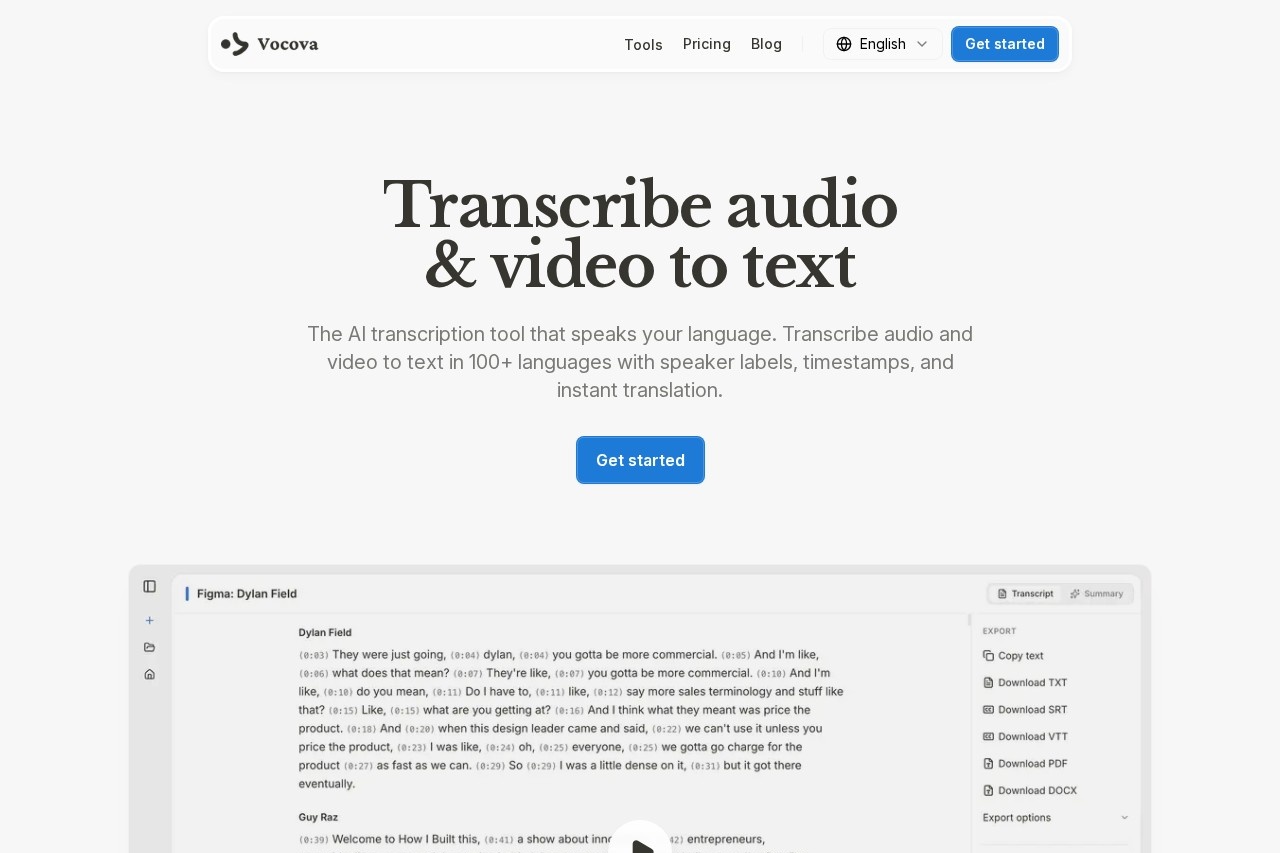
Vocova's AI automatically detects when different people are speaking and labels each speaker throughout the transcript. This feature proves invaluable for transcribing interviews, panel discussions, podcasts with multiple hosts, meeting recordings, and any content featuring multiple voices. Timestamps are included for each speaker segment, making it easy to locate specific moments in the original audio or video. Users can edit speaker labels after transcription, allowing for accurate attribution even when the AI makes occasional identification errors in complex audio environments.
📝 AI-Generated Summaries
Each transcript produced by Vocova includes an AI-generated summary that distills the key points from the audio or video content. This feature saves users significant time when reviewing lengthy recordings, allowing them to quickly determine whether the full transcript warrants detailed review. The summary extracts main topics, conclusions, and action items, providing a useful overview for meetings, lectures, interviews, and informational content. For content creators, these summaries can serve as starting points for show notes, blog posts, or social media captions derived from the transcribed material.
✏️ In-Browser Transcript Editor
Vocova includes a built-in transcript editor that allows users to refine and correct transcriptions directly in the browser. The editor supports real-time editing while maintaining synchronization with the original audio, so users can listen to specific segments while making corrections. Find and replace functionality speeds up bulk edits, and the interface allows easy navigation between speakers and timestamps. Changes are saved automatically, eliminating concerns about losing work. This integrated editing capability means users don't need to export transcripts to external applications for refinement, keeping the entire workflow within Vocova's streamlined interface.
📁 Multiple Export Formats
Vocova supports exporting transcripts in six different formats to accommodate diverse use cases: PDF for document sharing and printing, DOCX for word processing and further editing in Microsoft Word or Google Docs, SRT and VTT for subtitle files compatible with video platforms, TXT for plain text archival and processing, and CSV for data analysis and spreadsheet applications. This flexibility ensures that transcribed content integrates seamlessly with existing workflows, whether you're creating closed captions for YouTube videos, preparing interview transcripts for publication, or analyzing meeting content for business intelligence purposes.
Performance & User Experience
Vocova delivers impressive performance across most use cases, with transcription accuracy that rivals or exceeds many competitors in the market. The AI models powering the platform handle clear audio excellently, achieving accuracy rates above 95% for well-recorded content in major languages. Performance naturally decreases with background noise, overlapping speech, heavy accents, or technical jargon, but the built-in editor makes corrections straightforward. Processing speed is competitive—a typical 10-minute video usually transcribes within 2-3 minutes, though times may vary based on server load and content complexity.
The user experience is streamlined and intuitive. The clean interface guides users through the transcription process without unnecessary complexity: paste a link or upload a file, select language options, and receive results. The dashboard organizes transcripts chronologically with search functionality, making it easy to locate previous work. Real-time progress indicators keep users informed during processing. The speaker identification feature works well in most scenarios, though it occasionally struggles with similar-sounding voices or audio with significant background interference. Overall, the platform provides professional-grade transcription with minimal friction.
Performance Ratings
| Transcription Accuracy | ⭐⭐⭐⭐☆ (4/5) |
| Processing Speed | ⭐⭐⭐⭐☆ (4/5) |
| Language Support | ⭐⭐⭐⭐⭐ (5/5) |
| Platform Integration | ⭐⭐⭐⭐⭐ (5/5) |
| Ease of Use | ⭐⭐⭐⭐⭐ (5/5) |
Who Should Use Vocova?
🎬 Content Creators
YouTubers, podcasters, and video creators can quickly generate transcripts for SEO optimization, create subtitles for accessibility, and repurpose audio content into blog posts and articles. The direct platform import feature saves hours of manual work.
📰 Journalists & Researchers
Reporters and academic researchers can transcribe interviews, press conferences, and research recordings with speaker identification. The AI summaries help quickly identify key quotes and insights for articles and papers.
💼 Business Professionals
Teams can transcribe meetings, webinars, and conference calls for documentation and follow-up. The multi-platform support works seamlessly with Zoom, Google Meet, and Microsoft Teams recordings.
🌐 Multilingual Users
International businesses, language learners, and translators benefit from the extensive language support and bilingual transcript views. Perfect for creating localized content and understanding foreign-language materials.
Pricing Plans
🆓 Free Plan
$0/forever
- 120 minutes of transcription
- 100+ languages supported
- 1,000+ platform integrations
- Speaker identification
- AI summaries included
- No credit card required
⭐ Pro Plan
$9.99/month
- Unlimited transcription
- Priority processing
- Advanced export options
- Team collaboration
- API access
- Priority support
💡 Pricing Insight: Vocova offers one of the most generous free tiers among transcription tools, providing 120 minutes without requiring a credit card. The Pro plan's unlimited transcription at $9.99/month represents excellent value for heavy users.
Pros & Cons
✓ Pros
- Generous free tier - 120 minutes at no cost
- Massive platform support - 1,000+ integrations
- Extensive languages - 100+ transcription languages
- Speaker identification - automatic labeling
- AI summaries - key points extraction
- In-browser editor - easy corrections
- Multiple exports - SRT, VTT, PDF, DOCX
- No credit card - required for free plan
✗ Cons
- Accuracy varies - with audio quality
- Speaker detection - struggles with similar voices
- Processing time - can vary with server load
- Technical jargon - may need manual correction
- Limited free minutes - 120 may not suffice
- No mobile app - browser-based only
- Heavy accents - may reduce accuracy
- Background noise - affects transcription quality
Our Verdict
Highly Recommended
Exceptional value for multilingual transcription
Vocova stands out as one of the most compelling transcription tools for users who need multilingual support and broad platform integration. The combination of 100+ transcription languages, 145+ translation languages, and support for 1,000+ content platforms creates a uniquely versatile solution.
For content creators, the ability to paste a YouTube or TikTok link and receive a complete transcript with speaker labels and an AI summary represents enormous time savings. Journalists and researchers will appreciate the accuracy and the built-in editor for refining quotes and citations.
The limitations are those common to AI transcription—accuracy decreases with poor audio quality, overlapping speech, and heavy accents. However, the in-browser editor makes corrections straightforward, and the overall value proposition is exceptional.
Ready to Transcribe Your Content?
Start transcribing for free—no credit card required.
Frequently Asked Questions
Is Vocova really free to use?
Yes, Vocova offers a generous free tier that includes 120 minutes of transcription with no credit card required. The free plan includes access to all major features including multi-platform imports, speaker identification, AI summaries, and multiple export formats. For users with heavier transcription needs, affordable Pro plans are available.
What platforms does Vocova support for direct imports?
Vocova supports direct imports from over 1,000 platforms including YouTube, TikTok, Vimeo, Zoom, Google Meet, Microsoft Teams, Dropbox, Google Drive, OneDrive, podcast hosting services, and many social media platforms. Simply paste the link and Vocova handles the rest without requiring file downloads or uploads.
How accurate is Vocova's transcription?
Vocova achieves accuracy rates above 95% for clear audio in major languages. Accuracy depends on audio quality, background noise, accent clarity, and technical terminology. The built-in transcript editor allows easy corrections when needed. For best results, use high-quality recordings with minimal background noise and clear speech.
Can I export transcripts as subtitle files?
Yes, Vocova exports transcripts in SRT and VTT formats, which are the standard subtitle formats compatible with YouTube, Vimeo, social media platforms, and most video players. You can also export as PDF, DOCX, TXT, or CSV for other purposes like documentation, blog posts, or data analysis.
Does Vocova identify different speakers?
Yes, Vocova automatically detects when different people are speaking and labels each speaker throughout the transcript with timestamps. This feature is particularly useful for interviews, podcasts, meetings, and any content with multiple voices. You can edit speaker labels after transcription for accurate attribution.
What languages does Vocova support?
Vocova supports transcription in over 100 languages and translation to more than 145 languages. Major languages like English, Spanish, Chinese, French, German, Japanese, Arabic, and Hindi are fully supported, along with many regional and less common languages. The bilingual side-by-side view enables easy comparison between original and translated text.
🔗 Related AI Tools
- Otter.ai - Popular AI meeting transcription with real-time collaboration
- Happy Scribe - Professional transcription and subtitling platform
- Descript - All-in-one audio/video editor with AI transcription
- Rev - AI and human transcription services for maximum accuracy
- Sonix - Automated transcription with advanced editing features