Disclosure: This article contains affiliate links. If you make a purchase through our links, we may earn a commission at no extra cost to you. OpenCut offers free tools with optional premium features.
Last Updated: March 2026
⚡ TL;DR
OpenCut is a powerful AI media processing platform with 20+ tools for video, audio, and image editing. From automatic transcription and subtitle generation to vocal separation and video translation, it covers virtually every multimedia need. The browser-based interface requires no software installation, and the free tier lets you start immediately. Excellent value for content creators seeking comprehensive media tools.
What is OpenCut?
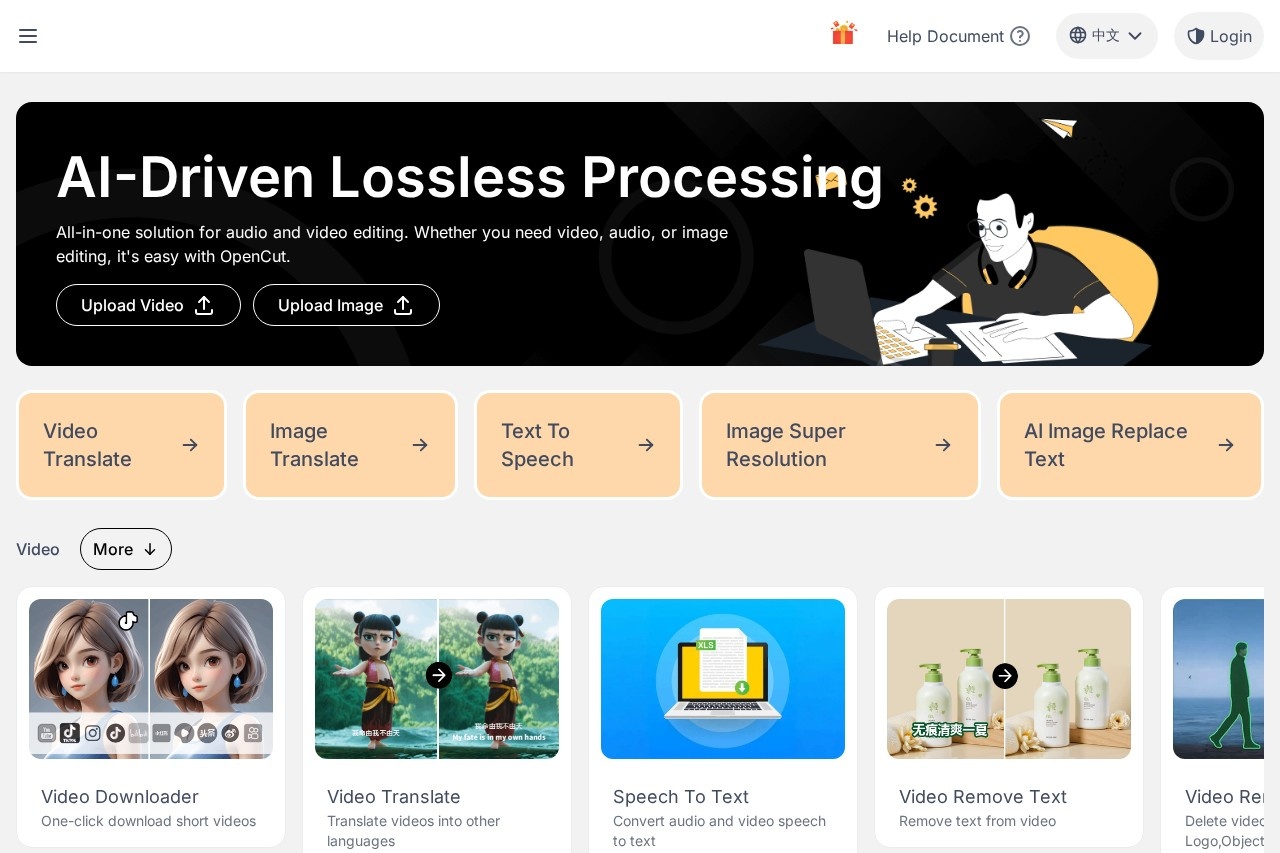
OpenCut is a comprehensive AI-powered media processing platform that consolidates over 20 intelligent audio and video editing tools into a single, browser-based interface. Designed for content creators, video editors, and social media managers, OpenCut eliminates the need for multiple specialized applications by offering video transcription, subtitle generation, video translation, vocal separation, image enhancement, and other features within one unified ecosystem.
The platform distinguishes itself through its extensive feature set spanning three main categories: video processing, image editing, and audio manipulation. Video tools include short video downloading, speech-to-text transcription (ASR), intelligent object removal, video-to-GIF conversion, video translation, text removal from videos, vocal separation, and video-to-anime conversion. Image capabilities encompass translation, super-resolution upscaling, text removal, background removal, anime-style conversion, and inpainting. Audio features cover video-to-audio extraction, audio splitting, mixing, text-to-speech synthesis, and audio concatenation.
Built on advanced deep learning models, OpenCut delivers professional-quality results without requiring users to understand complex AI technology. The platform supports both file uploads and URL parsing, allowing users to process content from sources including popular video platforms. With automatic noise filtering, multi-language support, and export options spanning TXT, SRT, and media formats, OpenCut streamlines workflows that would otherwise require multiple specialized tools and significant technical expertise.
Key Highlights
- 20+ AI-powered media tools in one platform
- Video transcription with SRT/TXT export
- Vocal separation and audio processing
- Video and image translation
- Browser-based, no installation required
Key Features
🎬 Video Transcription (ASR)
OpenCut's speech-to-text engine converts video and audio content into accurate text transcriptions using advanced automatic speech recognition technology. The system processes hours of content in minutes, automatically filtering background noise while preserving key information. Users can export results as TXT files for text use or SRT format for subtitle integration. The ASR supports multiple languages and handles audio qualities, making it suitable for podcasts, interviews, lectures, and social media content where accurate transcription is essential.
🎵 Vocal Separation
The vocal separation feature uses AI to isolate human voices from background music and ambient sounds in audio tracks. This proves invaluable for creating karaoke tracks, extracting clean voiceovers for repurposing, or isolating dialogue for audio restoration. The algorithm distinguishes between vocal frequencies and instrumental elements with impressive accuracy, producing separate files for vocals and accompaniment that can be independently edited or remixed according to project requirements.
🌐 Video Translation
OpenCut's video translation capability automatically translates spoken content and on-screen text within videos. The system first transcribes the audio, then translates the text to your target language, and can regenerate subtitles or even synthesize dubbed audio. This feature dramatically reduces the time and cost of localizing video content for international audiences, making it essential for YouTubers, educators, and businesses seeking to expand their reach across language barriers without hiring professional translators.
🖼️ Image Super-Resolution
The image super-resolution tool uses AI upscaling to enhance low-resolution images, increasing detail and sharpness while reducing artifacts. Unlike simple interpolation that merely enlarges pixels, OpenCut's AI predicts and generates missing detail based on patterns learned from high-resolution images. This transforms blurry captures, old photographs, or web-resolution images into clearer, larger versions suitable for printing or high-definition displays without the blocky artifacts of traditional upscaling methods.
✨ Intelligent Object Removal
OpenCut's object removal feature enables users to erase unwanted elements from both images and videos. The AI analyzes surrounding pixels and intelligently fills removed areas with contextually appropriate content, seamlessly blending the edit. This works for removing watermarks, unwanted people, bystanders, trash, or any distracting elements from your media. The video version maintains temporal consistency across frames, ensuring smooth playback without flickering artifacts common in simpler removal tools.
🗣️ Text-to-Speech Synthesis
The text-to-speech feature converts written text into natural-sounding speech using AI voice synthesis. Users can choose from multiple voice options with different characteristics—male, female, accents and tones—to match their content style. This proves useful for creating voiceovers, narration for videos, accessibility features for written content, or generating audio versions of articles. The synthesized voices sound increasingly natural, avoiding the robotic quality of earlier TTS systems.
Performance & User Experience
OpenCut delivers solid performance across its tool suite, with processing times varying based on media length and complexity. Transcription typically completes within minutes for hour-long videos, while image processing is near-instantaneous. The browser-based interface loads quickly and presents tools in an organized, intuitive layout. Users simply select their desired tool, upload content or paste a URL, and wait for processing—the entire workflow requires minimal technical knowledge.
Output quality is generally impressive, particularly for transcription accuracy and image enhancement tasks. Vocal separation produces clean results for most music tracks, though complex arrangements with overlapping frequencies may show some artifacts. Video translation works well for clear speech but may struggle with heavy accents or background noise. The platform handles multiple concurrent tasks well, and results can be previewed before downloading to ensure satisfaction. Some users report occasional processing delays during peak usage times, but overall reliability is good.
Performance Ratings
| Transcription Accuracy | ⭐⭐⭐⭐☆ (4/5) |
| Processing Speed | ⭐⭐⭐⭐☆ (4/5) |
| Tool Variety | ⭐⭐⭐⭐⭐ (5/5) |
| Ease of Use | ⭐⭐⭐⭐⭐ (5/5) |
| Output Quality | ⭐⭐⭐⭐☆ (4/5) |
Who Should Use OpenCut?
🎬 Video Creators
YouTubers, TikTok creators, and video producers benefit from transcription for captions, vocal separation for background music, and translation for international reach. The platform eliminates the need for multiple specialized tools.
🎙️ Podcasters
Audio content creators can transcribe episodes for SEO-optimized show notes, separate vocals from background music, and generate text versions for blog posts. The audio splitting and mixing tools streamline post-production workflows.
📱 Social Media Managers
Marketing professionals managing multiple platforms can quickly generate subtitles for engagement, translate content for global campaigns, and enhance images for posts. The batch processing capability saves significant time on routine tasks.
📚 Educators & Researchers
Teachers and researchers can transcribe lectures, interviews, and focus groups for documentation. The translation feature helps create multilingual educational materials, while transcription enables searchable archives of audio content.
Pricing Plans
🆓 Free Plan
$0/forever
- Access to all 20+ tools
- Limited daily processing
- Standard processing speed
- Basic export formats
- Community support
- No credit card required
⭐ Premium
From $9.99/month
- Unlimited processing
- Priority processing speed
- All export formats
- Higher quality output
- Priority support
- Batch processing
💡 Pricing Insight: OpenCut's free tier is genuinely useful, providing access to all tool types with reasonable daily limits. This allows users to thoroughly test capabilities before committing. Premium subscriptions unlock unlimited processing and faster speeds—worth considering for heavy users who need consistent daily access without processing caps. The platform offers flexible plans to accommodate different usage levels.
Pros & Cons
✓ Pros
- 20+ tools - comprehensive media suite
- Browser-based - no installation needed
- Free tier available - test before buying
- URL parsing - process from links
- Multi-format export - TXT, SRT, MP3, etc.
- AI-powered - high accuracy results
- Vocal separation - clean audio extraction
- Easy to use - intuitive interface
✗ Cons
- Processing queues - during peak times
- Free limits - daily caps apply
- Heavy accents - may affect transcription
- Complex audio - vocal separation artifacts
- Internet required - cloud processing only
- Chinese interface - primarily in Chinese
- Translation quality - varies by language
- Large files - longer processing times
Our Verdict
Recommended
Comprehensive AI media toolkit with excellent value
OpenCut stands out as one of the most comprehensive browser-based media processing platforms available. The sheer variety of tools—transcription, vocal separation, translation, image enhancement, and more—consolidates what would otherwise require multiple subscriptions into a single platform. For content creators who regularly work across different media types, this consolidation represents significant convenience and cost savings.
The platform excels at democratizing complex AI capabilities. Tasks like vocal separation or intelligent object removal that previously required expensive desktop software and technical expertise are now accessible through a simple web interface. The free tier is genuinely functional, allowing users to complete real work rather than merely preview features. This approach builds trust and lets users evaluate quality before committing financially.
The main limitations are those common to cloud-based processing—dependency on internet connectivity, queue times during peak usage, and privacy considerations for sensitive content. The Chinese-language interface may present challenges for some international users. However, for most content creation workflows, OpenCut delivers exceptional value, making it a worthy addition to any creator's toolkit.
Ready to Streamline Your Media Workflow?
Access 20+ AI media tools for free.
Frequently Asked Questions
Is OpenCut free to use?
Yes, OpenCut offers a free tier that provides access to all 20+ tools with daily processing limits. No credit card is required to start. For unlimited processing and premium features like priority speed and batch processing, paid plans are available starting at $9.99/month.
What file formats does OpenCut support?
OpenCut supports common video formats (MP4, MOV, AVI), audio formats (MP3, WAV, M4A), and image formats (JPG, PNG, WEBP). For exports, you can generate TXT and SRT subtitle files, MP3 audio, and image formats depending on the tool used.
How accurate is OpenCut's transcription?
OpenCut's ASR transcription achieves high accuracy for clear audio, typically above 90% for well-recorded content. Accuracy decreases with background noise, multiple speakers, heavy accents, or technical terminology. The system includes automatic noise filtering to improve results, and the exportable text can be manually corrected as needed.
Can I process videos from YouTube or other platforms?
Yes, OpenCut supports URL parsing, allowing you to paste links from supported video platforms directly into the tool. The system fetches the content automatically without requiring you to download and re-upload files. Supported platforms include major video sharing sites, though availability may vary based on platform restrictions.
Does OpenCut work offline?
No, OpenCut is a cloud-based platform that requires an internet connection. All processing occurs on remote servers equipped with the computational resources necessary for AI-powered tasks. This approach ensures consistent performance regardless of your device capabilities but means offline functionality is not available.
What languages does OpenCut support?
OpenCut supports multiple languages for transcription and translation, including English, Chinese, Japanese, Korean, and major European languages. The interface is primarily in Chinese, but the tools work well with international content. Translation accuracy varies by language pair, with common combinations typically producing the best results.
🔗 Related AI Tools
- Descript - AI-powered video and podcast editor with transcription
- CapCut - Free video editor with AI features and effects
- Vocal Remover - AI-powered vocal separation for music tracks
- Otter.ai - AI transcription and meeting notes platform
- VEED.io - Online video editor with AI subtitles and translation
FAQ
Is OpenCut free to use?
OpenCut lists “premium” — visit the official site for the current plan details.