Last Updated: March 12, 2026 | Review Stance: Real workflows tested by someone tired of draw.io manual hell
Skip to What Matters
One-Minute Verdict
If you're drowning in process docs, Slack threads, or napkin sketches and need a flowchart yesterday—this tool nails it. Text or photo in → clean editable diagram out, free credits daily, no bloated features. Not Miro-level fancy, but 10× faster for real work like onboarding flows or refund logic. I use it weekly now.
The Day I Stopped Redrawing Flowcharts Manually
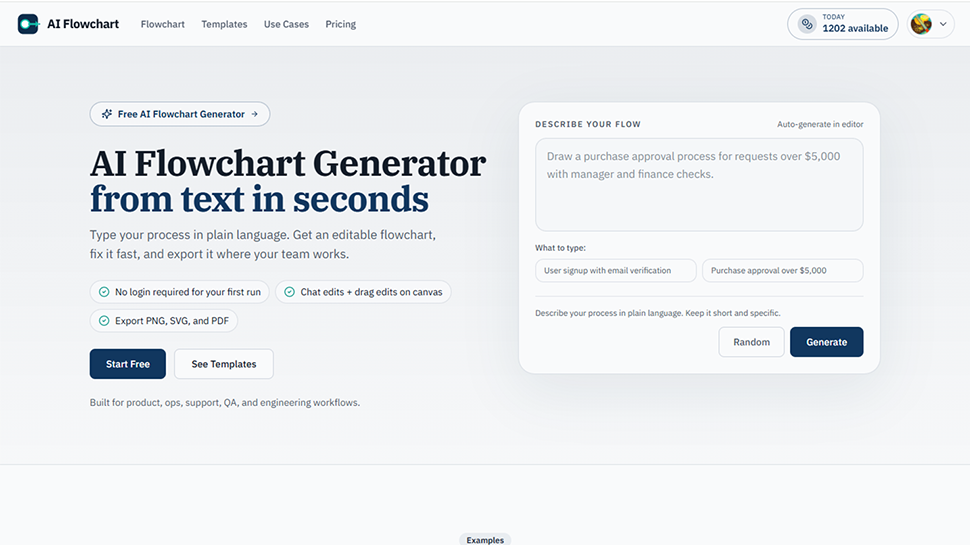
Picture this: Friday 5pm, support team pings about a confusing refund process. I have a 2-page SOP in Notion, a messy Miro board from last quarter, and zero time to redraw. I paste the text into aiflowchart.org... 12 seconds later, boom—decent flowchart with branches for "under $1000" vs "over", retry loops, and escalation steps. Exported to PDF for the team doc. Mind. Blown.
Since then I've thrown everything at it: onboarding sequences, canary deployment pipelines, incident response trees, even pseudocode logic from engineering. This 2026 review comes from actual chaos-mode usage—no cherry-picked demos.

Text prompt → instant onboarding flow with decision branches (official example)
Onboarding Chaos
New hire flows, trial periods, access provisioning.
Finance & Ops
Approval gates, refund/payout logic with conditions.
Support Triage
Ticket escalation, retry paths, resolution trees.
Engineering Pipelines
Canary deploys, incident response, CI/CD flows.
Features That Actually Get Used (Not the Fluff)
Daily Drivers
- Text → Flowchart Magic: Paste SOP paragraph or bullet list → auto branches, decisions, loops. Handles "if amount > 5000 then manager approve else auto-refund" perfectly.
- Sketch/Photo Upload: Snap whiteboard mess or napkin doodle → AI cleans it into editable nodes. Saved me from re-drawing bad meeting sketches.
- Chat Refinement: "Add exception for failed payment retry 3 times" → instantly inserts branch. Faster than dragging shapes.
- Templates Library: Pre-made starters for onboarding, refunds, support escalation—tweak instead of from-scratch.
- Exports Galore: PNG for Slack/PPT, SVG for Notion/Confluence, PDF for audit, draw.io for further edits.
- No Login for Quick Runs: Paste and go—login only for history/sync.
Speed & Reliability in Real Messy Work
Generation is stupid fast—under 15s for most prompts. Auto-layout is surprisingly smart (no overlapping spaghetti). Edits feel snappy on canvas. Failed gens don't eat credits—nice touch. Complex logic sometimes needs 1-2 refinements, but better than manual from zero.
What Keeps Me Coming Back
Sketch → Clean
Credit-Friendly
Practical Templates
Multi-Export
Pricing (No Surprises)
Free Daily
$0
Good for Most
- Daily generation credits
- No login for quick use
- Full core features
- Failed runs free
Paid Upgrade
Low Monthly
Heavy Users
- More monthly credits
- History & sync
- Priority generations
- Team-friendly
As of March 2026: Free daily credits cover 80% of my needs. Upgrade kicks in only for high-volume weeks. No hidden gotchas—check site for current limits.
Honest Pros & Cons After Months
Why It Wins
- Saves hours vs manual drawing
- Sketch upload is a lifesaver
- Practical templates for real biz flows
- Free daily = low barrier
- Exports play nice with other tools
- Chat edits feel natural
Where It Falls Short
- Not for super complex UML/ER (focused on flowcharts)
- Daily credits cap heavy days
- Occasional refinement needed for edge cases
- No deep integrations (standalone king)
Final Take: 8.8/10
AI Flowchart isn't trying to be everything—it's laser-focused on turning words/sketches into usable flowcharts fast. For anyone who hates diagramming but needs them yesterday, it's gold. Free entry makes it a no-brainer try; I've already recommended it to three ops friends.
Practicality: 9.1/10
Value: 9.0/10
Scope Fit: 8.0/10
Tired of Manual Flowcharts?
Paste your next process doc or snap a sketch—see a clean flowchart in seconds. Free credits waiting.
Daily free credits as of March 2026—no card needed to start.