How to Make Money With UPDF PDF Editor in 2026
Category: Monetization Guide
Excerpt:
Make money with UPDF in 2026: sell PDF editing, conversion, OCR, and form services. Real pricing, income ranges, and a step-by-step launch plan.
Reviewed by the aifreetool.site editorial team. This is an independent guide—we earn no commission and have no affiliate relationship with UPDF. We checked the live pricing page and tested the PDF editing tools before writing, so the numbers below reflect what we verified.
Quick answer: In 2026 you can make money with UPDF by selling PDF editing, conversion, OCR, and form-filling services to small businesses and professionals. A single clean conversion or form job pays $15–$60, and a steady client roster brings in $400–$1,500 a month.
Tool at a Glance: What UPDF Does
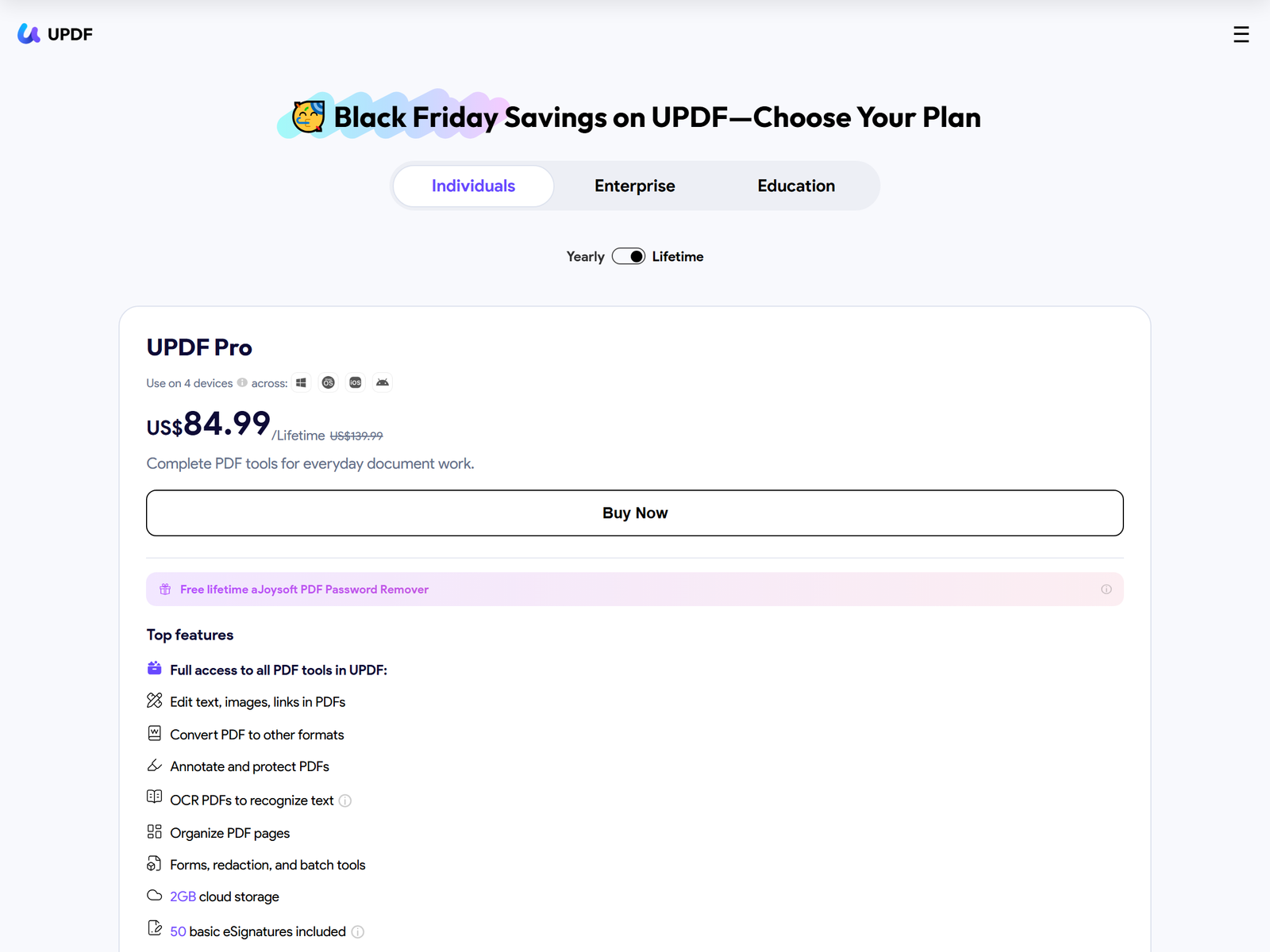
UPDF is a full PDF editor for Windows, Mac, iOS, and Android. You open a PDF and edit text and images directly, annotate it, convert it to Word, Excel, PowerPoint, or image formats, run OCR on scanned pages, fill and create forms, redact sensitive data, and organize or compress pages. One license works across four devices, which matters when you are handling client documents on more than one machine.
The plan you would run a service on is UPDF Pro Annual at about $49.99 a year (list prices we saw ranged from $49.99 to $64.99 by region). It removes the trial watermark and unlocks unrestricted editing, conversion, OCR, and batch processing. Pro Lifetime at roughly $79.99–$94.99 one-time suits a freelancer who wants to avoid a recurring bill. The free tier needs no card but limits you to two conversions a day, five OCR uses, and stamps most saved files with a trial watermark, so it is for practice only. The separate AI Assistant adds chat, summarize, and translate on top of the editor. UPDF reports more than four million users in over 200 countries.
| Plan | Price | Key limit | Best for your service |
|---|---|---|---|
| Free | $0 | 2 conversions/day, watermark | Learning and test runs |
| Pro Annual | ~$49.99/yr | Unlimited edits, no watermark | Solo PDF service |
| Pro Lifetime | ~$84.99 once | Future Pro upgrades included | Steady freelancer |
| Pro + AI | ~$128.99/yr | Document chat and translation | Document-heavy clients |
The detail that protects your margin is batch processing. A single license lets you convert, watermark, or renumber many files in one pass, so a twenty-document job takes minutes rather than hours. That throughput is what turns a $50 yearly tool into a service you can charge for repeatedly.
The Monetization Idea: A Done-for-You PDF Service
The service is simple: people have messy PDFs and no patience for them. You take scanned contracts, invoices, forms, and manuals and return clean, searchable, correctly formatted files. Common orders include scanned-to-editable OCR, PDF-to-Word conversion with formatting preserved, fillable form creation, redaction of private data, batch watermarking, and layout repair for documents that lost their structure in export.
Charge $15–$60 for a single conversion or form job and $200–$500 for a bulk cleanup of twenty or more files. Real estate agents, law firms, accountants, and course creators are repeat buyers. A part-time operator with five to eight regular clients earns $400–$1,500 a month, because document work recurs. Your tool cost stays near $50 a year while each small job sells for a third of a month's subscription, so gross margins are high once you get fast at the workflow.
Step-by-Step Action Plan
- Install the free version and practice on three sample jobs: a scanned invoice to editable Word, a fillable form, and a redacted contract.
- Upgrade to Pro before your first paid job so you can deliver files without a trial watermark.
- Package your samples as before-and-after screenshots and list fixed-scope gigs on Fiverr and Upwork.
- Pitch one niche first—real estate paperwork or accountant archives work well—so your samples match a buyer's actual files.
- Send ten short messages a week to firms whose documents are visibly scanned or badly formatted.
- Deliver a small preview, collect payment, then release the clean batch and ask for a repeat monthly arrangement.
Client and Quality Management
You can promise clean, searchable files, preserved layouts, fast batch turnaround, and redaction that removes visible sensitive text. You cannot promise a legally valid signature, perfect reconstruction of a badly scanned table, or that OCR will read handwriting flawlessly. Set those limits before you quote. Confirm the source format, desired output, and page count in writing, keep client files in a dedicated folder, and delete them after delivery. For redaction work, flatten the final PDF so underlying text cannot be recovered.
Pro Tips and Pitfalls
- Always request the original file when available; it beats converting a lossy scan.
- Quote per document or per batch, not per hour, so faster work raises your effective rate.
- Run an OCR accuracy check on names and numbers before delivering anything legal or financial.
- Sell a monthly document-cleanup retainer; paperwork never fully stops.
- Never promise confidential handling you cannot back up with a clear file-deletion policy.
Who This Is For (and Who Should Skip It)
This fits virtual assistants, admin freelancers, and anyone already doing document work who wants a higher-value add-on. It is a service business, not passive income, so skip it if you want hands-off earnings. You also need an eye for layout; a converted file with a broken table still looks wrong to a client. Pair PDF cleanup with a data-entry or transcription add-on and one brief can span several paid deliverables instead of a single discounted conversion.
My Take / The Bottom Line
UPDF wins as a money tool because PDF pain is universal and the fix is quick to deliver. The yearly license is under $50 while a single form or conversion job pays $15–$60, so you recover your cost with two or three jobs. The catch is trust: clients hand you contracts and invoices, so a clean deletion policy and careful redaction matter more than raw speed. Frame the offer as "send me the messy file, get back a clean one," price per batch, and push the monthly retainer. Do that and $400–$1,500 a month part-time is realistic. Build three before-and-after samples this week and list your first gig before you overthink the niche.
FAQ
Can I sell PDFs edited with UPDF?
Yes. The Pro plan unlocks commercial editing, conversion, and OCR with no trial watermark. The free tier stamps most saved files and is for practice only.
Which plan do I need to take clients?
Pro Annual (about $49.99 a year) is the practical starting point. Pro Lifetime costs more up front but removes the recurring fee if you expect steady work.
Will OCR read handwriting accurately?
Printed text is reliable; handwriting varies. Always spot-check names, dates, and figures before delivering a scanned document you have converted.
How should I price a conversion job?
Charge per document or per batch—roughly $15–$60 for a single job and $200–$500 for twenty or more files—so faster work raises your rate.
Is this passive income?
No. It is a service that trades on turnaround and trust. The recurring document cleanup retainer is what makes the income repeat month to month.
Review the official UPDF pricing, then read our UPDF profile on aifreetool.site. Find more playbooks in our Monetization Guide category, compare with Durable for client sites, or start at aifreetool.site.