How to Make Money With Gling AI Video Editing in 2026
Category: Monetization Guide
Excerpt:
Make money with Gling AI video editing in 2026: sell done-for-you edits to creators. Real pricing, income ranges, and a launch plan.
Reviewed by the aifreetool.site editorial team. This is an independent guide—we earn no commission and have no affiliate relationship with Gling. We checked the live pricing page and edited sample clips before writing.
Quick answer: In 2026 you can make money with Gling by selling done-for-you video editing to creators, coaches, and podcasters. A single cleaned-up video earns $30–$120, and a monthly package of edited videos brings in $400–$1,800 in revenue.
Tool at a Glance: What Gling Does
Gling is an AI video editor built for talking-head content. It finds and removes silences, filler words, and bad takes, then lets you fine-tune the cut by deleting lines from a transcript. It also generates AI captions as SRT files, YouTube titles and chapters, auto-framing, multicam edits, and AI B-roll suggestions. Over 50,000 creators use it, including large YouTube channels. It runs in a browser or as a desktop app on Mac and Windows, and it exports XML into Premiere Pro, Final Cut Pro, and DaVinci Resolve for final polish.
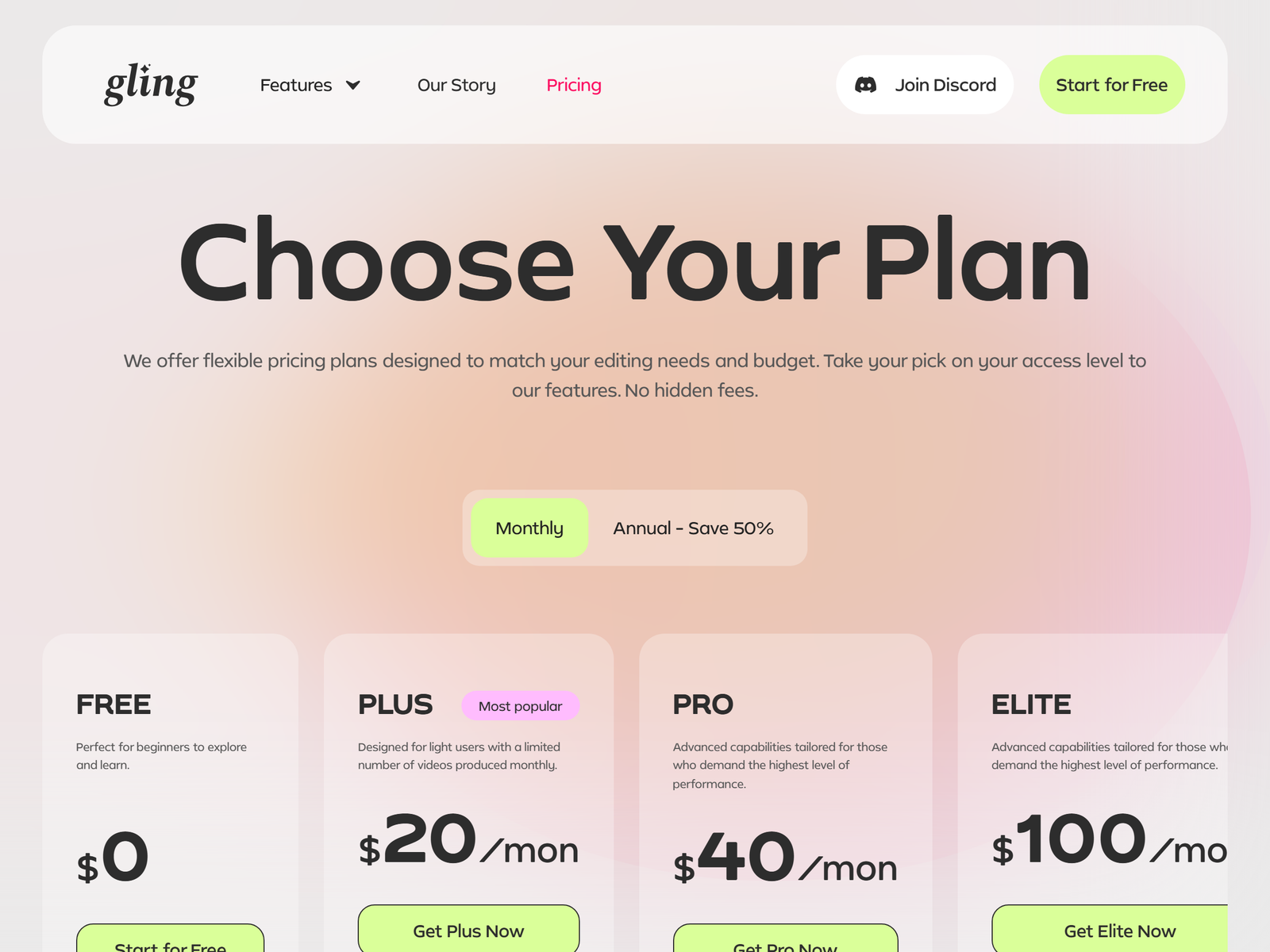
The plan most editors run on is Plus at $20 a month, or $10 a month billed annually, covering 10 hours of AI-edited media with no watermark. Pro at $40 monthly, or $20 annually, raises that to 30 hours and adds premium support. Elite at $100, or $50 annually, covers 100 hours for busy agencies. The free tier gives one hour a month but stamps a watermark on exports, so it is for practice only. Annual billing cuts the price roughly in half. Figures were checked in 2026 from the official pricing page.
| Plan | Price (annual) | AI-edited media / mo | Best for your service |
|---|---|---|---|
| Free | $0 | 1 hour, watermarked | Learning the workflow |
| Plus | $10/mo | 10 hours | First paid edits |
| Pro | $20/mo | 30 hours | Steady creator retainer |
| Elite | $50/mo | 100 hours | High-volume agency |
The detail that protects your margin is hours, not seats. A one-hour raw recording becomes a tight ten-minute edit in minutes, and you can resell that time as a fixed-price service. Captions and chapter generation are easy upsells because creators need them for reach.
The Monetization Idea: A Done-for-You Editing Service
Creators record far more than they can edit. A coach with six hours of raw footage does not want to spend a weekend trimming dead air. You take the files, run the first pass, fix the remaining cuts, and return a clean video plus captions. Common orders include YouTube uploads, online-course lessons, interview episodes, and video podcasts. You are selling saved hours and a reliable publishing schedule, not software access.
Charge $30–$120 per finished video depending on length, or $400–$1,800 a month for a package of four to eight edits. Compare that with a human video editor at $30–$75 an hour; your turnaround lets you serve more clients at a lower price point. Your tool cost stays near $10–$20 a month, so gross margins are wide once the workflow is familiar.
Step-by-Step Action Plan
- Use the free tier to edit three sample clips: a talking-head video, a tutorial, and a podcast episode.
- Pick one niche—coaches, educators, or video podcasters—so your samples match a buyer's content.
- List fixed-scope gigs on Upwork and Fiverr, naming the exact deliverable and turnaround.
- Send ten short messages a week to creators whose uploads drag or lack captions.
- Upgrade to Plus before your first paid job so the export is clean and unbranded.
- Deliver MP4 plus SRT captions, include one revision, and convert one-off clients into a monthly edit package.
Client and Quality Management
You can cut dead air fast, edit by transcript, add captions, and hand off XML to a client's own editor. You cannot add colour grading, motion graphics, or music-driven montage—Gling is built for dialogue, not cinematic work. Its silence detection is strong but not perfect, so review the cut before delivery. Agree on length, format, caption needs, and turnaround in writing. Ask for raw files and a clear brief, and send a short preview before the final export.
Pro Tips and Pitfalls
- Sell per finished video, not per hour, so a faster first pass raises your rate.
- Bundle captions and YouTube chapters as a no-brainer add-on.
- Keep a revision cap in the scope; transcript edits are cheap, but endless notes are not.
- Offer XML handoff for clients who finish in Premiere or Final Cut—it widens your market.
- Review automatic cuts carefully so an intentional pause is not trimmed away.
Who This Is For (and Who Should Skip It)
This fits video assistants, content freelancers, and editors who already understand pacing. It is a service business, not passive income, so skip it if you want to upload once and walk away. It also suits dialogue-driven content, not music videos or visual-first ads. Pair a Gling edit with a short-form clip or a caption pack and one client brief can span several paid deliverables.
My Take / The Bottom Line
Gling removes the most hated hour of video work, and that is exactly what clients will pay to avoid. Your cost sits near $10 to $20 a month while each finished edit sells for $30–$120. The catch is scope: stay with talking-head and podcast content, and leave graphics-heavy jobs to a full editor. Sell a repeatable monthly package, keep a tight revision cap, and proof every automatic cut. Do that and $400–$1,800 a month part-time is credible. Edit three sample clips this week and pitch a creator before you buy a premium plan.
FAQ
Can I deliver client work on the free plan?
The free tier exports with a watermark, so paid work should sit on Plus at $10 a month billed annually or above for a clean, unbranded file.
How fast can I finish a video?
A one-hour talking-head recording usually becomes a tight first cut in minutes. Your real time goes into review, captions, and the one revision round.
Does Gling replace Premiere Pro or Final Cut?
No. It handles the rough cut, then exports XML so you or the client can finish colour, graphics, and audio in a full editor.
What should I charge per video?
Start near $30 for a short talking-head clip and rise to $120 for a long, captioned edit. Price per finished video and raise rates as testimonials build.
Is this passive income?
No. Clients need reliable turnaround and occasional fixes. That reliability is also what turns one-off edits into a monthly retainer.
Check the official Gling pricing, then read our Gling profile on aifreetool.site. Browse more playbooks in our Monetization Guide category, compare with Descript for advanced editing, or start at aifreetool.site.