How to Make Money with LetsEnhance in 2026
Category: Monetization Guide
Excerpt:
Make money with LetsEnhance in 2026: upscale and restore images for POD sellers and stores, earning $300-1,500 a month on a $9-24 plan.
Reviewed by the aifreetool.site editorial team. This is an independent guide with no affiliate links — we earn no commission if you sign up.
Quick answer: In 2026 you can make money with LetsEnhance (Let's Enhance) by upscaling and restoring images for print-on-demand sellers, e-commerce stores, and photographers who need large, crisp prints. Realistic income is $300–1,500 a month running a $9–24 monthly plan.
What Let's Enhance does and the plan you'd use
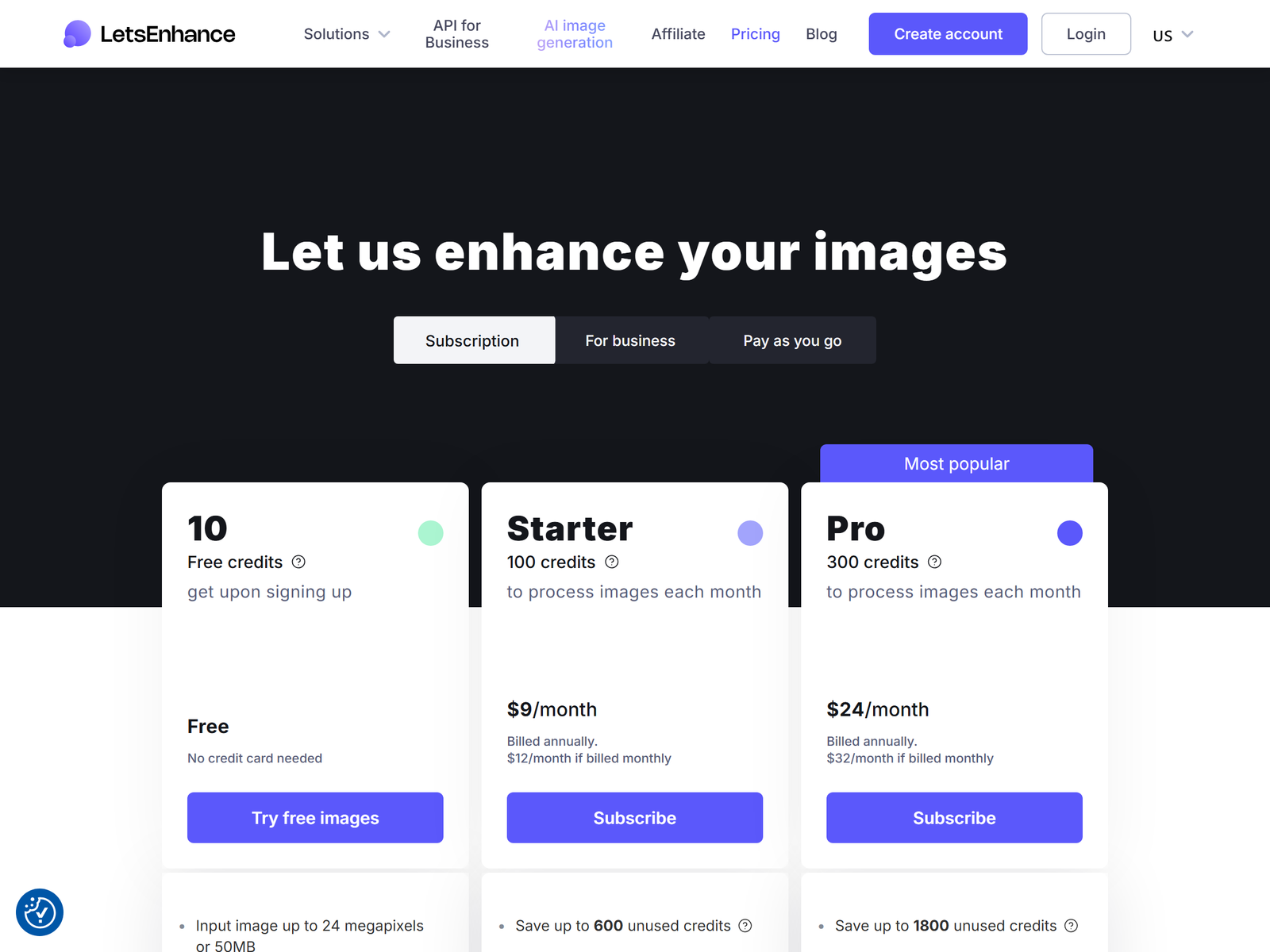
Let's Enhance is an AI image upscaler and repair tool. It offers seven processing modes — Prime, Gentle, Balanced, Strong, Ultra, Digital Art, and Old Photo — and can enlarge an image up to 16x while rebuilding detail rather than just stretching pixels. It reaches 256–512 megapixels on paid plans, which is what print houses need for posters and canvas. A 2026 pricing page shows 10 free credits on sign-up, then Starter at $9 per month billed annually ($12 monthly) for 100 credits, Pro at $24 per month annually ($32 monthly) for 300 credits and up to 350 MP, and Max at $34 per month annually for 500 credits and 512 MP. One image costs one credit, and unused credits roll over on personal plans. For a solo service, Starter or Pro is enough.
| Plan | Price (annual) | Credits | Max output |
|---|---|---|---|
| Free | $0 | 10 credits | Watermarked |
| Starter | $9/mo | 100 / month | 256 MP |
| Pro | $24/mo | 300 / month | 350 MP |
| Max | $34/mo | 500 / month | 512 MP |
The monetization idea: an image-resolution service
The buyer is anyone sitting on a small, blurry, or old image they need big and clean: Etsy print sellers with low-res AI art, Shopify merchants with weak product photos, real-estate agents with cropped listing shots, and families with torn old photographs. You sell "I will make this print-ready." A single upscale is $3–10, a restored old photo is $10–30, and a bulk pack of 20 product images is $40–120. Run ten to thirty jobs a week and you clear $300–1,500 a month, with your only real cost the $9–24 subscription. The work is repeatable because online stores relist every season.
Step-by-step: from sign-up to first paid client
- Sign up and use your 10 free credits to practice on a low-res logo and an old family photo.
- Learn the modes: Digital Art for AI-generated art, Old Photo for scans, Prime for general photos.
- Make three sample pairs: a pixelated logo at 4x, a scratched photo restored, and a product shot upscaled for a banner.
- List gigs: "Upscale your image to print quality", "Restore old photographs", and "Fix and enlarge product photos".
- Take the first few at $5–10 to build reviews, then move to standard pricing.
- Offer a bulk rate for store owners who send 20 or more images at once.
Managing clients and quality
Always ask the intended print size and DPI before you start, because a 24x36 inch poster at 300 DPI needs a 4x–8x upscale, and you should tell the client if the source is too small to look good. Deliver both the upscaled JPG and the original. For old-photo restoration, set the expectation that heavy damage may still show — the AI rebuilds texture but cannot invent missing faces. Keep client images in separate folders; the service stores them for a few months, but you should keep your own backups. Send a short note explaining the DPI you targeted so the printer has no surprises.
Pro tips and pitfalls to avoid
- Sell print-on-demand bundles: upscale a seller's art, then suggest poster and canvas sizes they can list.
- Use batch mode for store catalogs, because processing 20 images at once is far faster than one by one.
- Do not promise original quality from a 200px thumbnail; be honest about source limits, since overpromising earns refunds.
- Avoid the free tier for paid work — outputs carry a watermark until you subscribe.
- Watch the credit math, because at $9 for 100 credits you earn far more per credit than the plan costs, so volume is your friend.
Who this is and isn't for
Good for patient, detail-minded people who like photography and e-commerce. Poor for anyone who wants instant passive income, because this is a per-image service you must deliver. You do not need design skills, just good judgment about what an image can handle and clear communication with the buyer.
My Take / The Bottom Line
Let's Enhance is a quiet earner because almost every online seller eventually needs a bigger, cleaner image, and the $9 entry plan keeps risk tiny. The repeat business is in e-commerce stores that relist seasonally and POD artists who publish new designs weekly. Stack it with a background-removal upsell and your average order grows. Skip the free tier, lead with honest sizing advice, and you build a steady $300–1,500 a month. Compare it with VanceAI if you want a second upscaler, and read the LetsEnhance tool page for the full feature list.
FAQ
Will upscaling fix a very low-resolution image?
It rebuilds detail well, but a tiny source under 300px still will not look photographic at poster size, so set expectations early.
How many images can I process for $9?
The Starter plan gives 100 credits a month; one image equals one credit, so 100 images, with rollover.
Is this good for print-on-demand?
Yes. Upscaling AI art to 300 DPI prepares files for poster and canvas printing, a common seller need.
Do I need Photoshop?
No. Let's Enhance is a focused upscaler; you manage delivery and client comms, not pixel-level editing.
Can I restore old family photos?
The Old Photo mode repairs scratches and damage and colorizes; results vary with source condition.
Review Let's Enhance official pricing for current credit limits, and explore Etsy to gauge demand for print-ready art. Browse more playbooks in our Monetization Guide category.