How to Make Money with Kapwing Video Editor in 2026
Category: Monetization Guide
Excerpt:
Make money with Kapwing in 2026: turn the browser video editor into a captioning and short-form clip service earning $500-2,500 a month on Fiverr.
Reviewed by the aifreetool.site editorial team. This is an independent guide with no affiliate links — we earn no commission if you sign up.
Quick answer: In 2026 you can make money with Kapwing by selling done-for-you video captioning, short-form clipping, and simple editing to creators, coaches, and small businesses on Fiverr and Upwork. Realistic income runs $500–2,500 a month once you have a few repeat clients, using Kapwing's Pro plan at $16 per month billed annually.
What Kapwing is and the plan you'd use
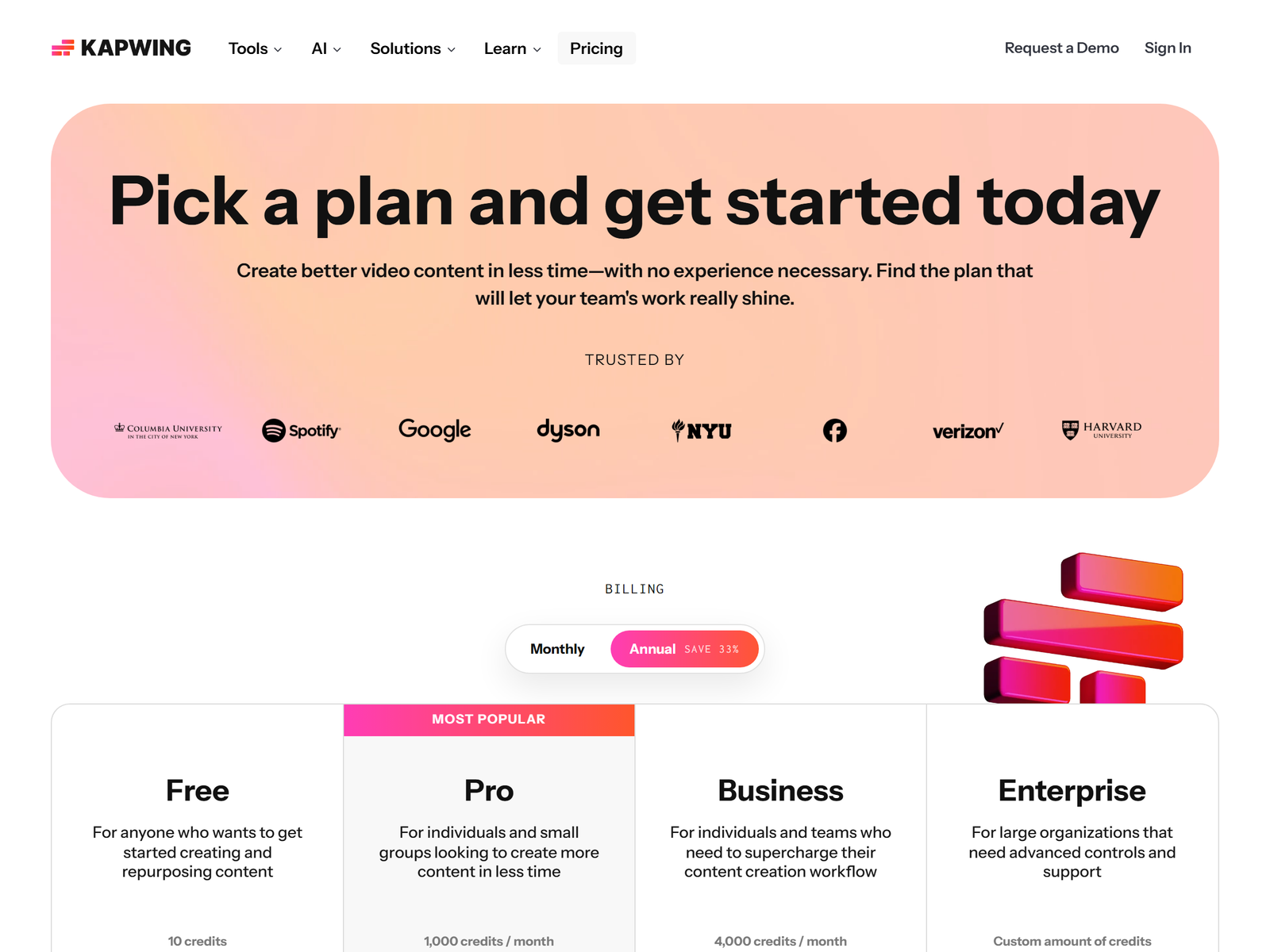
Kapwing is a browser-based collaborative video editor. You edit in the browser, with no desktop software to install, and it ships AI features that fit a service business perfectly: auto-subtitles in 60+ languages, a smart cut that removes silences and filler words, a background remover for video and images, AI text-to-speech, auto-translate for captions, and a resize tool that refits a video to any platform aspect ratio. A 2026 Kapwing pricing page lists a Free plan with unlimited watermarked exports and 10 AI credits, a Pro plan at $16 per member per month billed annually ($24 monthly) with 1,000 credits, 4K export, no watermark, and 100 GB storage, and a Business plan at $50 per member per month billed annually ($64 monthly) that adds custom voice clones and lip sync. For a one-person service you only need Pro.
| Plan | Price (annual) | What you get | Best for |
|---|---|---|---|
| Free | $0 | Watermarked exports, 10 AI credits | Learning the tool |
| Pro | $16/mo | 1,000 credits, 4K, no watermark, 100 GB | Solo freelancers |
| Business | $50/mo | 4,000 credits, voice clones, lip sync | Small teams |
The monetization idea: a video cleanup service
The job you sell is simple: creators, coaches, podcasters, and local businesses record rough footage and pay you to return a polished, captioned, platform-ready video. On Fiverr and Upwork these gigs are crowded but steady. A realistic starter rate is $20–80 per short video for caption plus trim plus resize, and $150–500 for a batch of short-form clips cut from a long recording. One freelancer with five repeat clients at $100–300 a month each lands $500–2,500 a month, and the marginal cost is just your $16 Pro subscription plus time. You are not competing with enterprise studios; you are competing with the cheaper freelancer who delivers late and ignores caption accuracy. Win on reliability.
Step-by-step: from sign-up to first paid client
- Open a Kapwing Pro account and practice on a 10-minute YouTube talk or podcast.
- Build three reusable templates: a captioned square clip, a 9:16 vertical short, and a 16:9 clean cut.
- Record a 60-second before/after sample showing raw footage next to your captioned, resized output.
- Publish three Fiverr gigs: "Add accurate subtitles to your video", "Cut long videos into TikTok and Reels shorts", and "Clean up and resize podcast clips".
- Price the first five jobs at $15–25 to earn reviews, then raise to market rate.
- Ask every happy client for a recurring monthly package, such as eight clips a month.
Managing clients and quality
Set expectations in writing: turnaround of 24–48 hours, one included revision, and delivery of both an MP4 and an SRT file. Use Kapwing's auto-subtitle then read every caption, because automatic speech-to-text still mangles brand names and technical terms, and a client will notice. Keep a separate folder per client so assets never mix. For podcasters, run the audio through Kapwing's clean-audio step before exporting; it removes background noise and evens loudness, which is the line between amateur and pro. A quarterly refresh call keeps the relationship alive and surfaces new work.
Pro tips and pitfalls to avoid
- Offer caption translation to a second language, since Kapwing auto-translates to 60+ languages; bilingual creators pay a premium.
- Bundle a monthly content refresh so clients prepay, which smooths your income across slow weeks.
- Do not promise frame-perfect color grading — Kapwing is not Premiere, and scope creep kills margin.
- Avoid the free plan for paid work; the watermark and four-minute cap will embarrass you on a client file.
- Watch your credit use, because auto-subtitling long files eats credits; quote per-minute rates so heavy jobs stay profitable.
Who this is and isn't for
This works best for someone comfortable in a video editor who can keep a promise about deadlines. It is a poor fit if you hate repetitive trimming or cannot stand reading captions for errors. You do not need to be a filmmaker — clients hiring on Fiverr mostly want "clear, captioned, and on time," not cinematic. Treat it as a dependable trade skill rather than a creative outlet.
My Take / The Bottom Line
Kapwing is one of the lowest-friction ways to start a video service because the tool is free to learn and the paid plan is $16 a month. The money is in repeat clients, not one-off gigs, so build a monthly package early. Pair it with a second skill like thumbnail design and you have a small agency. If you only run free-plan watermarked clips, you will never earn — treat Pro as the cost of doing business. See the Kapwing tool page for the current feature list, and compare it with VEED if you want a second editor in your stack.
FAQ
Do I need video editing experience to start?
Basic comfort is enough. Kapwing's auto-subtitle and smart cut do the heavy lifting while you manage trimming, styling, and accuracy.
How fast can I get my first client?
With a finished before/after sample, most freelancers land a first paid job within one to two weeks on Fiverr at an intro price.
Is the Free plan enough?
No. The watermark and four-minute cap make it unusable for paid delivery. Pro at $16 a month is the entry ticket.
What should I charge?
Start at $15–25 per short for reviews, then $20–80 per video and $150–500 per batch once you have proof of work.
Can I serve non-English creators?
Yes. Kapwing auto-translates captions to 60+ languages, so bilingual captioning is a paid upsell.
Check Kapwing's official pricing for current plan limits, and browse Fiverr to see live demand for captioning gigs. Browse more playbooks in our Monetization Guide category.