How to Make Money Selling Web Data With Browse AI in 2026
Category: Monetization Guide
Quick answer: You can make money selling web data with Browse AI by building no-code scrapers and monitors for e-commerce brands, recruiters, and agencies. Operators typically earn $600-$2,500 a month, charging $200-$800 to set up a robot plus $50-$300 a month to keep it running, on a Browse AI Professional plan at $99 a month.
Last updated by the aifreetool.site editorial team on September 1, 2026. This guide is independent; we have no affiliate relationship with Browse AI, and our income figures come from public platform pricing and freelancer rate data.
What Browse AI Does and the Plan You Would Use
Browse AI is a no-code web scraping and monitoring platform. You train a "robot" by clicking the fields you want on a website, and it learns the pattern, then runs on a schedule and dumps fresh data to Google Sheets, Airtable, or a webhook. No XPath, no Python, no proxy management. It handles pagination, logins, and JavaScript-heavy pages, and it ships prebuilt robots for common sites like Amazon, LinkedIn, and Indeed. More than 500,000 users extract billions of rows a month.
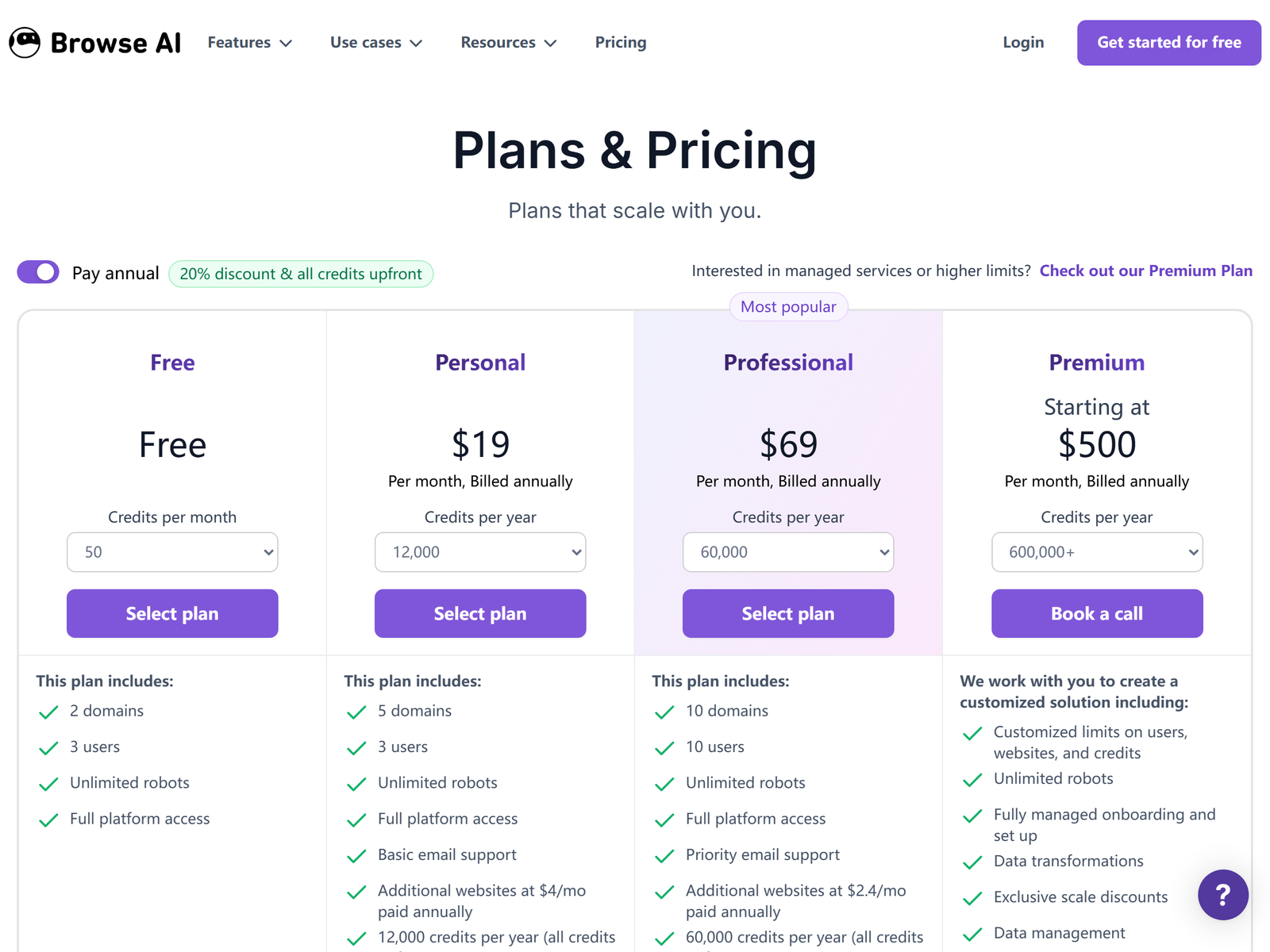
Pricing in 2026 is credit-based. The Free plan gives 50 credits a month for testing. Starter is $19 a month billed annually with about 2,000 credits and 10 robots, fine for light use. Professional is $99 a month billed annually with roughly 10,000 credits, 20 robots, and advanced API access, and is the plan most services run on. Team is $249 a month for multi-user work. A credit covers about one page extracted, so a weekly 100-product scrape costs about 10 credits; a heavy hourly monitor costs more.
| Plan | Monthly price (annual) | Credits / month | Best for |
|---|---|---|---|
| Free | $0 | 50 | Testing |
| Starter | $19 | ~2,000 | Light freelancers |
| Professional | $99 | ~10,000 | Active service |
| Team | $249 | Multi-user | Agencies |
The Monetization Idea: A Data-Extraction Service Bureau
Instead of selling one-off scrapes, you sell a running robot plus a monthly monitor. An e-commerce brand wants competitor prices tracked every Monday. A recruiter wants new job posts pulled daily. An agency wants a lead list refreshed each week. You train the robot once, wire it to their sheet, and bill a setup fee plus a retainer to keep it alive.
Income breaks down like this: $200-$500 to build and connect a robot, $500-$800 for a multi-source dashboard, and $50-$300 a month per client to keep monitors running and alert on changes. A part-time operator with four to eight clients earns about $600-$2,500 a month. Because Browse AI runs the extracts on schedule, your work is setup and exception-handling, not manual copying.
A real example shows the spread. A Shopify store wants 200 competitor SKUs priced weekly and alerted on a 5% move. You train one robot, point it at their Google Sheet, and schedule a Monday run. You charge $400 setup plus $150 a month. The run costs about 20 credits, so the compute is cents; almost the entire fee is profit after the $99 plan. Three such stores clear $1,650 a month, and the retainers compound because the robot runs whether you log in or not.
Step-by-Step Action Plan
- Open a Browse AI Professional account and train one robot on a public pricing page to learn the click-to-train flow.
- Define two offers: "Price monitor setup $400 + $150/mo" and "Lead list builder $600 + $200/mo".
- List on Upwork and Fiverr as "no-code web scraping" to catch e-commerce and recruiting buyers.
- Approach three local stores or agencies with a free 20-row sample pulled from their own site.
- Connect the robot to their sheet, set the schedule, and document the fields so they can self-serve later.
Client Management and Quality Control
- Confirm each target site's terms before scraping; public pages are defensible, logged-in data is not.
- Alert the client when a site changes layout, because robots need occasional retraining.
- Validate the first few extracts by hand; messy pages produce messy rows that need cleanup.
- Cap monitor frequency to the client's real need; hourly runs burn credits and margin for no reason.
Pro Tips and Pitfalls to Avoid
- Specialize in one use case, such as competitor pricing or job-board tracking, so your robots and pitches stay sharp.
- Do not scrape private or login-walled data without clear permission; that is where legal risk lives.
- Avoid over-monitoring; a daily run beats an hourly one for most clients and protects your credit budget.
- Watch the credit math on huge directories; a 500-page scrape can eat a Starter plan in one run.
Who This Is and Isn't For
This fits operators who can train a robot and explain a spreadsheet, and who want recurring revenue from installed monitors. It is a poor fit if you dislike client setup or cannot handle a site that breaks a robot. You do not need to code, because the GUI covers training. To push extracted data into client workflows, see Zapier's profile on aifreetool.site as a companion, and review Browse AI's profile on aifreetool.site for the feature list.
Your First Client This Week
Find three small stores whose competitors list public prices, then send each owner a free 20-row sample of their rival's catalog pulled with Browse AI. The sample proves the value faster than a written pitch. One converted store funds the Professional plan many times over, and the monthly monitor keeps them on your books.
Frequently Asked Questions
Q: Do I need to code to use Browse AI?
A: No. You train a robot by clicking fields in the browser; the platform handles selectors and scheduling.
Q: How much should I charge for a monitor?
A: $200-$800 to set up plus $50-$300 a month per client, depending on sources and run frequency.
Q: Which Browse AI plan do I need?
A: Professional at $99 a month, because Starter's credits run out fast once you run several weekly robots.
Q: Is web scraping legal?
A: Public pages are generally defensible; logged-in or paywalled data is not, so confirm each site's terms first.
My Take / The Bottom Line
Browse AI turns a developer-only job into a click-trained service with recurring revenue, and the $99 plan keeps your margin high while monitors run whether you log in or not. The catch is that you sell an installed, maintained robot, not a one-off file, so your setup skill sets the ceiling. Study the numbers at browse.ai/pricing and the demand at Fiverr, then start from Browse AI's profile on aifreetool.site or the Monetization Guide category.