How to Make Money Creating Videos With InVideo
Category: Monetization Guide
By the aifreetool.site editorial team. This is an independent guide; we do not earn a commission if you sign up for any tool mentioned here.
Quick answer: You can make money creating videos with InVideo by selling finished promo and social clips to local businesses, coaches, and solo creators for about $150 to $600 per video, which typically builds to $800 to $2,500 a month once you have a handful of recurring clients.
What InVideo Is and the Plan You Would Use
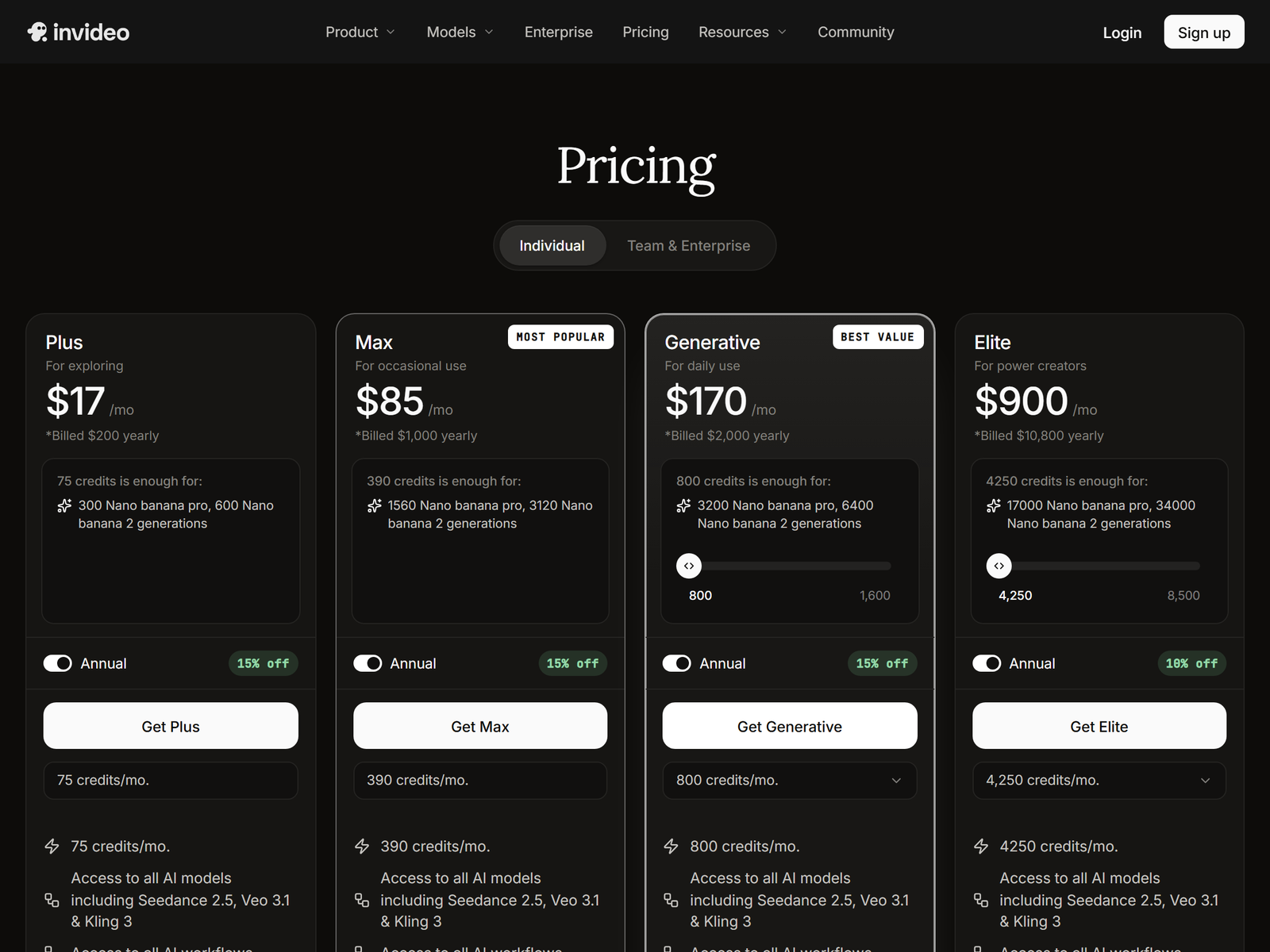
InVideo is a browser-based AI video maker that turns a script, a blog post, or a simple prompt into a finished video with stock footage, an AI voiceover, background music, and burned-in captions. You never open a timeline if you don't want to: you describe the video, the tool assembles it, and you trim the result. That speed is exactly why it works as a paid service.
The free plan exports four watermarked videos per week, which is fine only for practice. For paid client work you need at least the Plus plan, about $20 per month when billed annually (roughly $25 month-to-month), which removes the watermark and raises exports to 60-plus per month. The Max plan, about $60 per month, adds 4K export, AI avatars, and unlimited rendering for high-volume shops. The built-in iStock and Storyblocks library means you are not hunting for footage, and the brand kit lets you lock a client's colors, fonts, and logo into every video automatically.
The Monetization Idea: A Done-for-You Video Service
The offer is straightforward. Small businesses, realtors, dentists, fitness coaches, and YouTubers all need short videos but hate the editing. You take their website or a one-paragraph brief and return a polished 30- to 90-second clip they can post the same day. Pricing that holds up in the market: $150 to $400 for a single social promo, $300 to $600 for a 60- to 90-second explainer, and $300 to $900 per month for a retainer that covers four to eight videos. A part-time operator with two or three retainers realistically earns $800 to $2,500 a month, and a focused full-time studio can clear $4,000-plus by stacking niches.
| Plan | Price (annual) | Exports | Watermark | Best for |
|---|---|---|---|---|
| Free | $0 | 4 / week | Yes | Learning the editor |
| Plus | ~$20 / mo | 60+ / mo | No | Solo client work |
| Max | ~$60 / mo | Unlimited | No | Agencies, 4K, avatars |
Step-by-Step Action Plan
- Pick one niche. Realtors, local gyms, or medspas beat "any video." You learn their language and reuse templates.
- Set up the Plus plan and build a brand kit with two or three sample clients in mind.
- Produce a 3-video sample pack (an intro, a testimonial-style clip, a promo) so your gig has proof.
- List on Fiverr and Upwork at a $150 starting price, and cold-email 20 nearby businesses with one sample attached.
- Deliver in 48 hours with both a vertical (9:16) and a horizontal (16:9) file, then ask for a testimonial.
- Upsell a monthly retainer after the second order so revenue stops depending on fresh leads.
Client and Quality Management
Set expectations up front: InVideo stitches licensed stock footage, it does not shoot custom video. Deliver a watermark-free MP4 in both aspect ratios, and use the brand kit so colors and the logo stay consistent. Promise a two- to three-day turnaround and cap revisions at one or two rounds in writing. For voiceover, the built-in AI voices are good enough for most promos; upload a 30-second clean sample only if the client wants voice cloning on Max. Keep raw exports in a client folder so re-edits take minutes, not hours.
Pro Tips and Pitfalls to Avoid
- Use the AI script helper, but rewrite the first line yourself so the hook sounds human.
- Always export vertical and horizontal; most clients forget to ask and blame you later.
- Do not promise "custom footage" you cannot deliver; sell the stock-powered format honestly.
- Avoid the free plan for paid work; the watermark kills the deliverable.
- Batch-generate a month of a client's videos in one session to protect your margin.
- Watch for repetitive B-roll on longer videos; swap a few clips by hand to avoid the "AI look."
Realistic Expectations: Who This Is For
This works best for someone comfortable with marketing copy and fast turnarounds who wants a low-equipment side income. It is not a path to cinematic narrative films, and you are a production service, not a film studio. If you already write ad copy or manage a social account, video is a natural add-on you can charge extra for.
Key Takeaways
- InVideo Plus (~$20/mo) is enough to start charging clients.
- Charge per video ($150-600) or a monthly retainer ($300-900).
- Own one local industry instead of selling "any video."
- Deliver vertical and horizontal on every order.
- Retainers, not one-offs, are what push you past $2,000 a month.
My Take / The Bottom Line
InVideo is the fastest on-ramp I have seen to a real video income because it removes the editing learning curve almost entirely; you are selling speed and polish, not craft. The danger is commoditization, so protect your margin with retainers and deep niche focus, and never compete on price alone. Browse more AI tool guides on aifreetool.site.
Compare plans on the official InVideo pricing page and find your first clients on Fiverr.
Full specs and current features live on the InVideo tool page on aifreetool.site.
Frequently Asked Questions
Do I need video editing experience to start?
No. InVideo builds the edit from a script; you only tweak text, clips, and timing.
Which plan do I need for client work?
The Plus plan, about $20 per month billed annually, removes the watermark and gives enough exports for several small clients.
How much should I charge?
$150 to $400 for a short social promo, $300 to $600 for a 60- to 90-second explainer, or $300 to $900 a month for a steady retainer.
Can I use the footage commercially?
Yes. Paid plans include commercial rights to the generated video and the stock media used inside it.
What is the biggest mistake beginners make?
Selling generic "any video" instead of owning one local niche where you already understand the buyer.