How to Make Money Building Websites With Framer
Category: Monetization Guide
Quick answer: You can make money building websites with Framer by selling design-forward marketing sites and landing pages to startups, indie founders, and local businesses. A single landing page runs $300 to $600, a full marketing site $800 to $1,500, and a monthly care retainer $100 to $300. Most operators earn $1,000 to $4,000 a month part-time once they have a repeatable template and a steady pipeline. This guide is written by the aifreetool.site editorial team. We have no affiliate relationship with Framer, and every link below points to the tool's official site or to our own pages.
Key Takeaways
- Framer turns one text prompt into a complete, responsive site, so you sell taste and speed rather than raw effort.
- Tool cost is tiny ($10 to $30 a month) next to what you charge, which keeps margins above 80 percent.
- The fastest offer is a landing-page package for new startups and product launches.
- Use Framer's AI Agents and AI Translate to ship multilingual, polished sites faster than a freelancer on Figma.
- Internal link: review features on the Framer AI tool page (https://aifreetool.site/tool/framer-ai/) before you quote a client.
What Framer AI Does (and the Plan You'd Use)

Framer is a website builder that generates a full, responsive site from a single text prompt: hero, feature sections, testimonials, pricing, FAQ, and footer, with real typography, color, and animation. After generation you refine everything in a visual canvas. In June 2026 Framer added in-canvas AI Agents that build and edit pages, components, CMS content, and SEO settings using Claude or GPT models, plus AI Translate for 100-plus languages and an AEO Scanner for answer-engine optimization.
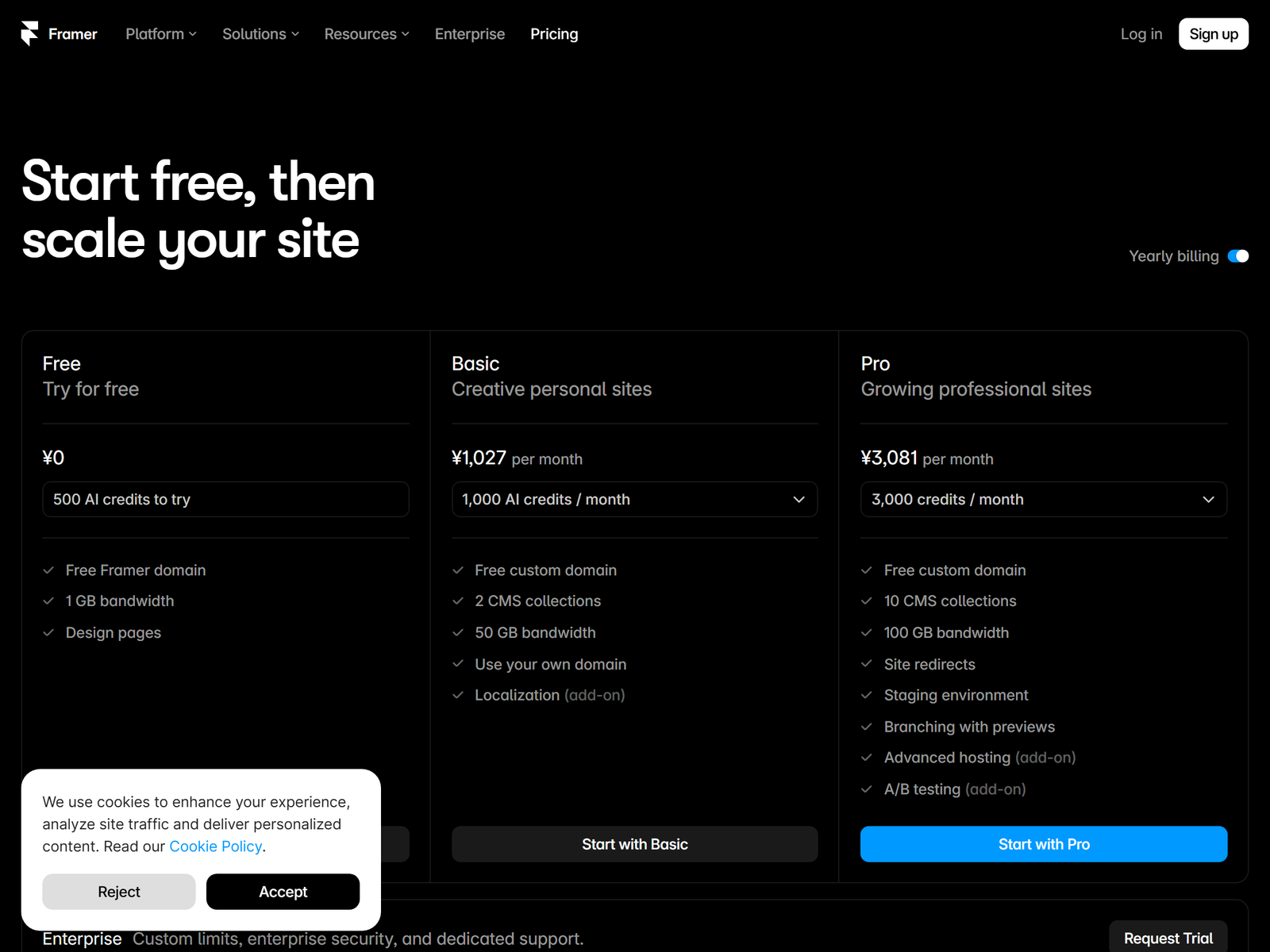
Pricing on Framer's pricing page runs: Free (Framer subdomain, AI generation, 10 CMS items), Basic at $10 a month billed annually ($15 monthly) with a custom domain and core hosting, Pro at $30 a month annually ($45 monthly) with up to 2,500 CMS items, staging, branching, and A/B testing, and Enterprise custom. Editor seats cost extra (about $20 a month per additional editor). AI runs on a credit allowance (Basic 1,000, Pro 3,000 credits a month). For client work you would run Pro at $30 a month and bill the client's own Framer plan.
The Service to Sell: Framer Site Builds
The offer is simple: you design and build marketing sites and landing pages that look like they cost ten thousand dollars. Three packages convert best. A landing page for a launch or waitlist ($300 to $600). A full marketing site with blog and CMS ($800 to $1,500). A monthly care plan for updates, A/B tests, and analytics ($100 to $300). Buyers are new startups on Product Hunt, indie hackers shipping a side project, coaches selling a course, and local service businesses that still have a stale template site. You win on design quality and speed, not on being the cheapest option.
Step-by-Step: From Sign-Up to First Paid Client
- Sign up free and spend a weekend learning the canvas and the AI prompt flow.
- Build two or three template sites in one niche (a SaaS landing page, a coach site, a local business site).
- Set flat package prices and a clear revision policy (two rounds included).
- Find clients on IndieHackers, X, Reddit's r/SaaS, and by cold-emailing newly funded startups and local chambers of commerce.
- Run a 20-minute discovery call, generate the first draft with AI, customize copy and brand, then hand off with a Loom walkthrough.
- Collect a testimonial, raise your prices, and repeat.
Pricing Your Framer Packages
| Package | What's included | Price | Margin note |
|---|---|---|---|
| Landing page | Hero, 3 sections, copy, mobile pass | $300 to $600 | ~$280 profit at $30 tool cost |
| Marketing site | Up to 8 sections, CMS, blog, SEO | $800 to $1,500 | ~$750 plus profit |
| Care plan | Updates, A/B tests, analytics, 2 hours a month | $100 to $300 a month | Recurring, low effort |
| Add-ons | Multilingual version, extra pages | $150 each | High margin |
Client Management and What You Can't Promise
Set expectations early. Framer is excellent for marketing sites and landing pages but is not built for complex web apps, and it has no native store (use a Shopify embed). Hosting lives on Framer; you can keep the project on your account or transfer it to the client's own Framer account so they pay their plan. Lower tiers cap CMS items, so confirm content volume before quoting. Always deliver a short Loom and a backup export so the client is never locked in.
Pro Tips and Pitfalls
Use AI Agents for the first draft, AI Translate when a client sells in two markets, and the AEO Scanner to make pages readable by AI search. Build a small component library (nav, pricing, testimonial) so every new site starts at 70 percent done. The common pitfalls are underpricing, unlimited revisions, skipping the mobile pass, and promising e-commerce you cannot deliver. Scope the revision rounds in writing.
Who This Is and Isn't For
This works best for people with design taste and the confidence to sell a premium service: freelancers, designers, and founders. It is a poor fit if you want pure no-code simplicity (Framer has a learning curve) or if you plan to build app-like products with auth and databases.
My Take: The Bottom Line
Framer is the best leverage available to a designer who can also sell. Margins stay high because the tool is cheap and the output looks expensive, so you are paid for judgment, not keystrokes. Start with landing pages for launches, where speed is the whole value proposition, and avoid the race to the bottom on gig marketplaces by positioning as a brand partner. A realistic operator reaches $1,000 to $4,000 a month within three to six months, then grows by adding care plans that pay every month for little new work.
FAQ
Do I need to know how to code?
No. Framer is visual, and its AI writes the page structure from a prompt. You edit by clicking, not by coding.
How fast can I deliver a site?
With a template, a landing page takes one to two days, and a marketing site takes three to five. Speed is your selling point.
Can clients edit their own site later?
Yes. Framer's CMS is editor-friendly; train the client in a 10-minute Loom and hand over the account.
What about hosting and domains?
Framer hosts the site, and from the Basic plan up you connect the client's own domain. No separate hosting bill exists.
Is Framer better than Wix for this business?
For design quality Framer wins by a wide margin, which is why you can charge more. Wix is simpler but looks more templated.