How to Make Money Selling Social Media Designs With Canva
Category: Monetization Guide
You can make money selling social media designs with Canva, and a part-time operator realistically earns $400 to $1,800 a month after software. The work is taking a local business's brand and turning it into a month of polished posts, stories, and ad creatives, then charging for the template system and the steady output. Your tool bill is about $13 a month, and you invoice $150 to $600 per client for a content month. Last updated August 21, 2026 by the aifreetool editorial team. We verified every price on the vendor's pricing page in August 2026; this is an editorial guide and carries no affiliate links.
Quick answer: you are selling a consistent, on-brand social presence, not access to the software. The buyers who say yes are restaurants, salons, gyms, realtors, and solo coaches who know they need to post but cannot design to save their life.
Canva is covered on the Canva profile on aifreetool.site, and it is the default design tool for non-designers, with 250,000-plus free templates and 100 million-plus premium assets on paid plans. The full feature set and live plans are on the official Canva site. Here is the plan, the pricing, and the parts that go wrong.
What Canva Does and What It Costs
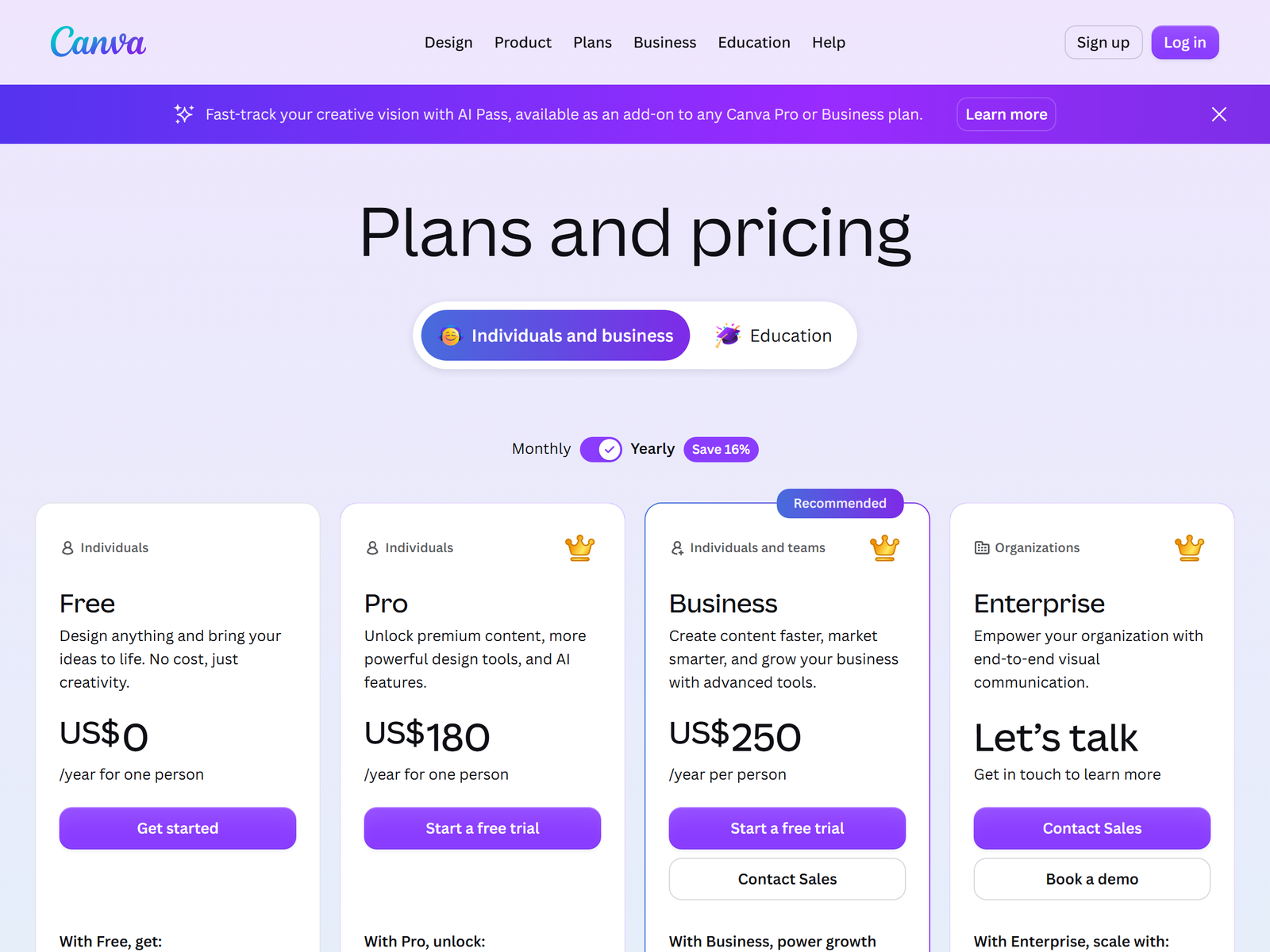
Canva is a drag-and-drop editor with a Brand Kit that stores a client's logos, colors, and fonts so every post stays on-brand. Pro adds Magic Resize, which reflows one design into every platform format instantly, a background remover, and 100 million-plus stock photos and elements. Its AI Magic Studio generates images and layouts from a prompt. With 200 million-plus users, clients have almost always heard of it, which makes handoff and edits painless.
| Plan | Monthly (annual) | What you get | Best for |
|---|---|---|---|
| Free | $0 | 250K+ templates, 5GB, no Brand Kit | Learning the editor |
| Pro | $15 / month ($12.99 annual) | Brand Kit, Magic Resize, 100M+ assets | Solo designers, 1 client |
| Teams | $10 / user / month (min 3) | Shared Brand Kits, approvals, admin | Agencies, many clients |
Pro at $12.99 billed annually is the floor for paid work: the Brand Kit and Magic Resize are what let you serve a client in minutes instead of starting from a blank canvas each post. The free plan has no Brand Kit, so every design drifts off-brand, and that is exactly the problem you are hired to solve. Move to Teams at $10 a seat only when you manage several client brands and need shared kits and approval workflows.
The Service You Sell and What It Pays
Sell a content-month or per-asset design service, not "Canva files". Price by the volume and the brand setup.
- Brand setup: $80 to $200. Build the Brand Kit, a template set, and a cover style.
- Post bundle: $150 to $400. 15 to 30 on-brand posts for the month.
- Stories and reels: $100 to $250. A set of vertical assets per campaign.
- Ad creative pack: $120 to $300. Static and carousel ads that match the brand.
- Monthly design retainer: $300 to $800. A steady stream plus two revision rounds.
Two retained clients at $300 to $800 plus one-off bundles put you between $500 and $1,600 in revenue against a $13 tool bill. Realistically a part-timer handles three to six active clients, because each post is a template tweak and a resize, not custom illustration. The buyers who say yes fastest are local restaurants, salons, gyms, realtors, and coaches whose feed is empty or off-brand.
Step-by-Step: From Free Plan to First Paid Client
- Open the free plan and design three mock brand kits to learn Magic Resize and the asset library.
- Pick a lane: local business posts, ad creatives, or coach content.
- Build a before-and-after: a messy phone graphic versus your branded post.
- Send a sample pack plus a one-page price sheet, then ask for a paid $150 bundle.
- Collect the client's logo, colors, and fonts, build the Brand Kit once.
- Design the month in a batch, resize to every format with Magic Resize.
- Deliver a share link plus exported PNGs and a posting calendar.
- Offer a monthly retainer the moment they ask for "next month too".
- Upgrade to Pro at $13 the week you sign a paying client, because the free plan has no Brand Kit.
Quality Control and the Pitfalls
Canva's templates are a starting point, not a finish line, so never ship a design that still shows the default placeholder text or a crown-locked element, because a client spots a half-finished template instantly and it kills trust. The second trap is the asset licence: Pro covers the stock you use in delivered designs, but the client must stay on a paid plan to keep editing them, so tell them up front. Finally, set a revision cap in writing. Unlimited "make it pop" requests eat the margin on a $150 bundle, so quote two rounds and bill the rest, because each resize and export is your time.
FAQ
Is Canva Pro worth $13 if I use Adobe Express?
For client social work, yes. Canva's Brand Kit and Magic Resize suit repeat, multi-format posting better than Express's template focus. If you have a paying client, the $13 is nothing next to the invoice.
Can I use Canva output commercially for client posts?
Yes. Pro's stock and elements are licensed for the designs you deliver. The client owns their brand; you deliver the files and the template system.
How many clients before I need Teams?
Three to six on Pro is plenty. Move to Teams at $10 a seat only when you manage several brands needing shared kits and approvals.
Should the client keep editing the designs?
Yes, and that is the upsell. Hand them the Brand Kit and a template set so they can tweak posts, which justifies the monthly retainer and keeps you in the account.
How long does one content month take?
Roughly two to five hours including brand setup, batch design, and resize, against days of hiring a designer. That speed is the offer.
My Take: The Bottom Line
The software is not the moat. Anyone can pay $13. What clients pay for is a person who learns their brand once, then keeps them looking consistent every single week without bugging them. Canva makes the posts; you do the taste, the system, and the reliability.
My honest read: this is the most local, referral-friendly design business in this category because every town has a dozen shops with an empty feed, and a happy restaurant owner sends you two more. It is a poor fit for anyone who dislikes light revision rounds, and it is not passive income. The tool profile is at the Canva page on aifreetool.site, current plans are on canva.com/pricing, and more playbooks sit in our Monetization Guides. Open the free plan tonight, mock three brand kits, and charge for the first real client tomorrow.