How to Make Money With Uizard (UI Design) in 2026
Category: Monetization Guide
Excerpt:
Make money with Uizard in 2026 by turning founder ideas into app and website UI mockups. A practical freelance design service guide with pricing.
Reviewed by the aifreetool.site editorial team. This is an independent guide; we are not affiliated with Uizard and earn no affiliate commission if you sign up.
Quick answer: Yes. In 2026 you can make money with Uizard by turning founder ideas, sketches, and screenshots into clean app and website UI mockups. Uizard is an AI UI design tool that converts text prompts, hand-drawn wireframes, and app screenshots into editable, high-fidelity prototypes, so you can sell a design-to-prototype service without being a Figma expert. Charge $150 to $600 per project or $300 to $1,500 per month per client, and realistically earn $500 to $2,500 per month part-time.
What Uizard is (and the plan you would use)
Uizard is an AI-powered UI design platform aimed at non-designers. You describe an app or web page in plain text, upload a photo of a paper sketch, or paste a competitor screenshot, and Uizard returns an editable wireframe with real components. Its flagship feature, Autodesigner 2.0, lets you edit a screen by describing the change in natural language, such as "make the hero darker" or "add a pricing section." It also exports developer handoff in React and CSS.
Unlike a full design suite, Uizard targets the early concept stage, which is exactly where most founders and agencies need help. The work that remains for you is choosing layouts, applying the client's brand, and preparing an investor-ready or developer-ready file.
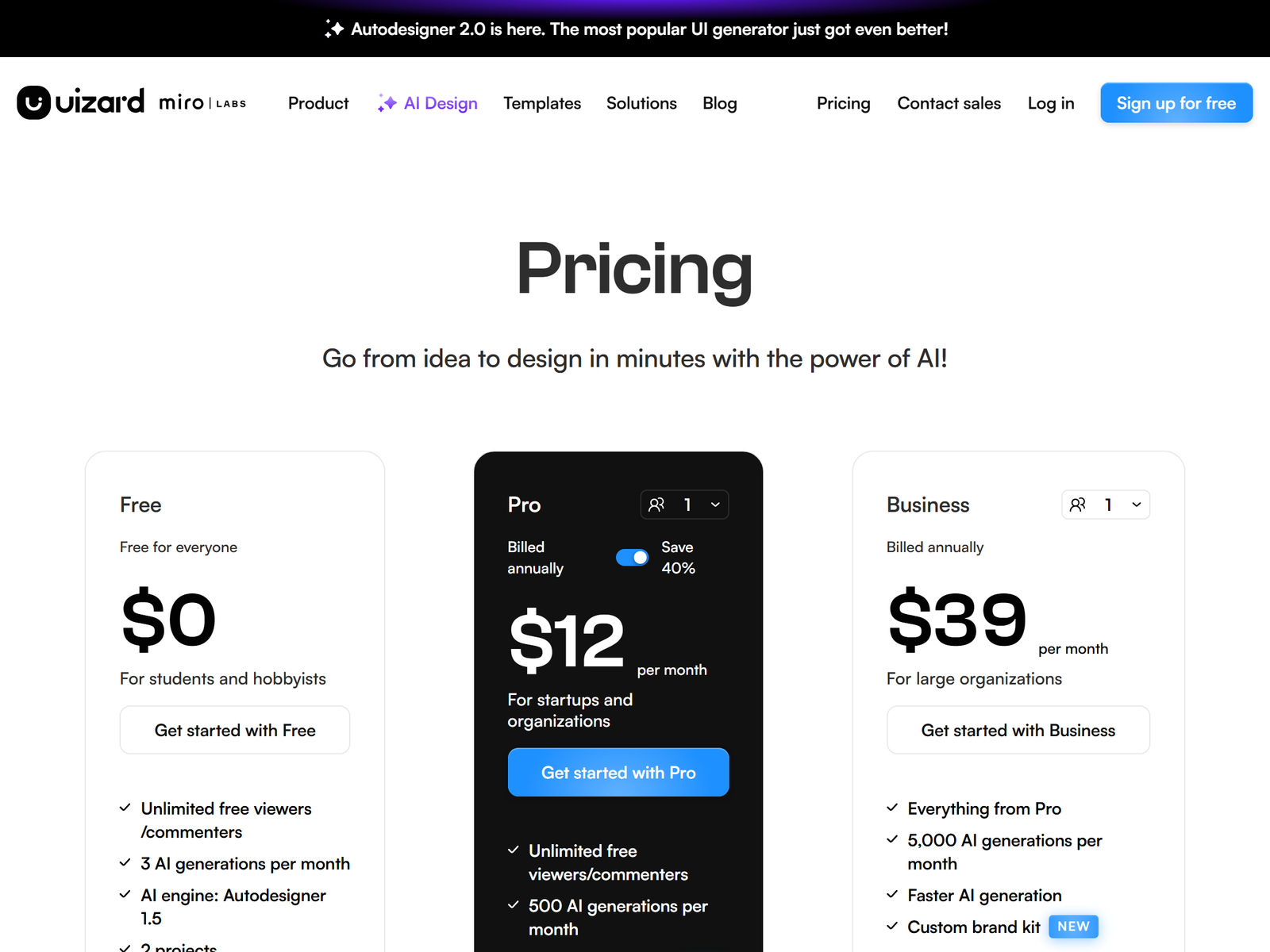
Uizard pricing in 2026:
| Plan | Price | AI generations | Best for |
|---|---|---|---|
| Free | $0 | 3 per month | Testing the output |
| Pro | $12/mo (billed annually) | 500 per month | Solo designers, up to 100 projects |
| Business | $39/mo (billed annually) | 5,000 per month | Teams, unlimited projects |
The Pro plan at $12 per month unlocks Autodesigner 2.0, 500 generations, and 100 projects, which is what you need to deliver client work fast. You can check the Uizard pricing page for current details. For a print-on-demand design angle, the Kittl page on aifreetool.site covers a different design tool.
The monetization idea: a UI mockup and prototype service
The offer is "we will turn your idea into a clickable prototype this week." Most founders have a vision but cannot draw it, and most agencies bill senior designers at high rates for early drafts. You use Uizard to produce the first pass in minutes, then refine it with the client. The client pays for speed and a file they can show investors or hand to a developer.
A practical example: a founder has a napkin sketch for a budgeting app. You scan it into Uizard, generate five screens, apply a clean theme, and export a clickable prototype plus a one-page spec. They pay $400 and use it to raise a seed round. They renew at $300 a month for ongoing feature screens.
Price by deliverable, not by hour:
- Single screen set (3 to 5 screens): $150 to $300.
- Full app or site prototype (15-plus screens): $400 to $600.
- Monthly product-design retainer: $300 to $1,500 per client.
Your software cost is one Pro seat at $12. Even with three $400 projects you clear about $1,100 a month after tool cost, and the generation is mostly automated. The remaining work is layout judgment, branding, and client calls. Because Uizard handles production, your edge is taste and the ability to translate a vague brief into a clear flow.
Step-by-step: from sign-up to first paid client
- Open a Uizard Pro account and build a strong sample from a text prompt.
- Write a tight offer: "App and website UI mockups from your idea, from $200."
- List it on Fiverr and Upwork, and DM ten early-stage founders on LinkedIn.
- Send a one-page brief (goal, audience, must-have screens, brand colors).
- Generate the draft in Uizard, then edit section by section with natural language.
- Export a clickable prototype and a developer handoff file.
Managing clients and quality
Set the screen count and revision rounds up front. Uizard generates fast, so the risk is endless tweaks, not slow output. Agree on two revision rounds per project. Save each client's theme and brand kit in Uizard so new screens stay consistent without re-briefing.
Deliver both a shareable link and an exported file they own. Track requests in a simple board so renewals are based on shipped screens, not vibes.
Pro tips and pitfalls to avoid
- Specialize by product type (fintech, fitness, marketplace) to reuse prompts.
- Cap revisions in the contract to protect your margin.
- Use the Screenshot Scanner to clone a competitor flow as a starting point.
- Do not promise pixel-perfect production design; sell the prototype stage.
- Batch a few client projects to keep your calendar free.
Who this is and isn't for
This suits people who enjoy visual structure and can explain a user flow simply. You do not need to be a Figma expert, because Uizard supplies the components. It is a weak fit if you dislike client messaging or want passive income, since the model depends on project work and outreach.
Former product managers, agency producers, and no-code builders do well here because they already think in screens and user stories. The tool speeds production; your judgment about layout and clarity is what clients pay for. For a video prototyping angle, the Kapwing page covers a browser video editor.
My Take / The Bottom Line
Uizard lets one person do the job that used to need a junior product designer for early-stage mockups. The arbitrage is clear: founders will pay far more than $12 a month to see their idea as a real, clickable prototype. Lock three project clients first, systematize your brief, and scale by niche. I would start with early-stage founders because they feel the design pain daily and decide fast.
Find more tool-by-tool playbooks in the Monetization Guide category, or browse the aifreetool.site home.
Frequently Asked Questions
Do I need design skills to sell this?
No. Uizard supplies the components and AI generation. You edit for brand fit and clarity, which is faster than designing from a blank canvas.
How many clients can one Pro seat handle?
Pro covers 500 generations and 100 projects per month, enough for roughly 5 to 8 small clients on a light cadence.
What should I charge a first-time founder?
Start at $200 for a small screen set and $400 to $600 for a full prototype. Add a $100 onboarding fee for the brand kit setup.
Can Uizard export to developers?
Yes. It exports developer handoff in React and CSS, so your prototype moves straight into build.
Is the free plan enough to start?
It allows 3 generations and 2 projects, fine for one sample. Most operators grow into the $12 Pro plan quickly for client volume.