How to Make Money Selling Meeting Notes With Fireflies.ai in 2026
Category: Monetization Guide
Quick answer: reviewed by the aifreetool.site editorial team, this is an independent how-to with no affiliate relationship with Fireflies.ai. In 2026 you can make money selling meeting notes with Fireflies.ai by turning client call recordings into clean transcripts, summaries, and action-item documents. A solo operator bills $200 to $600 a month per client, or $500 to $1,800 a month across several accounts.
What Fireflies.ai is and the plan you would use
Fireflies.ai is an AI meeting notetaker. Its bot joins Zoom, Google Meet, and Microsoft Teams calls, or you upload audio files, and it returns a transcript, a structured summary with decisions, and a list of action items. AskFred answers questions across past meetings, and it syncs to more than 100 apps including Salesforce, HubSpot, Slack, and Notion. Fireflies says it serves 500,000-plus organizations, so the buyer is already familiar with the category.
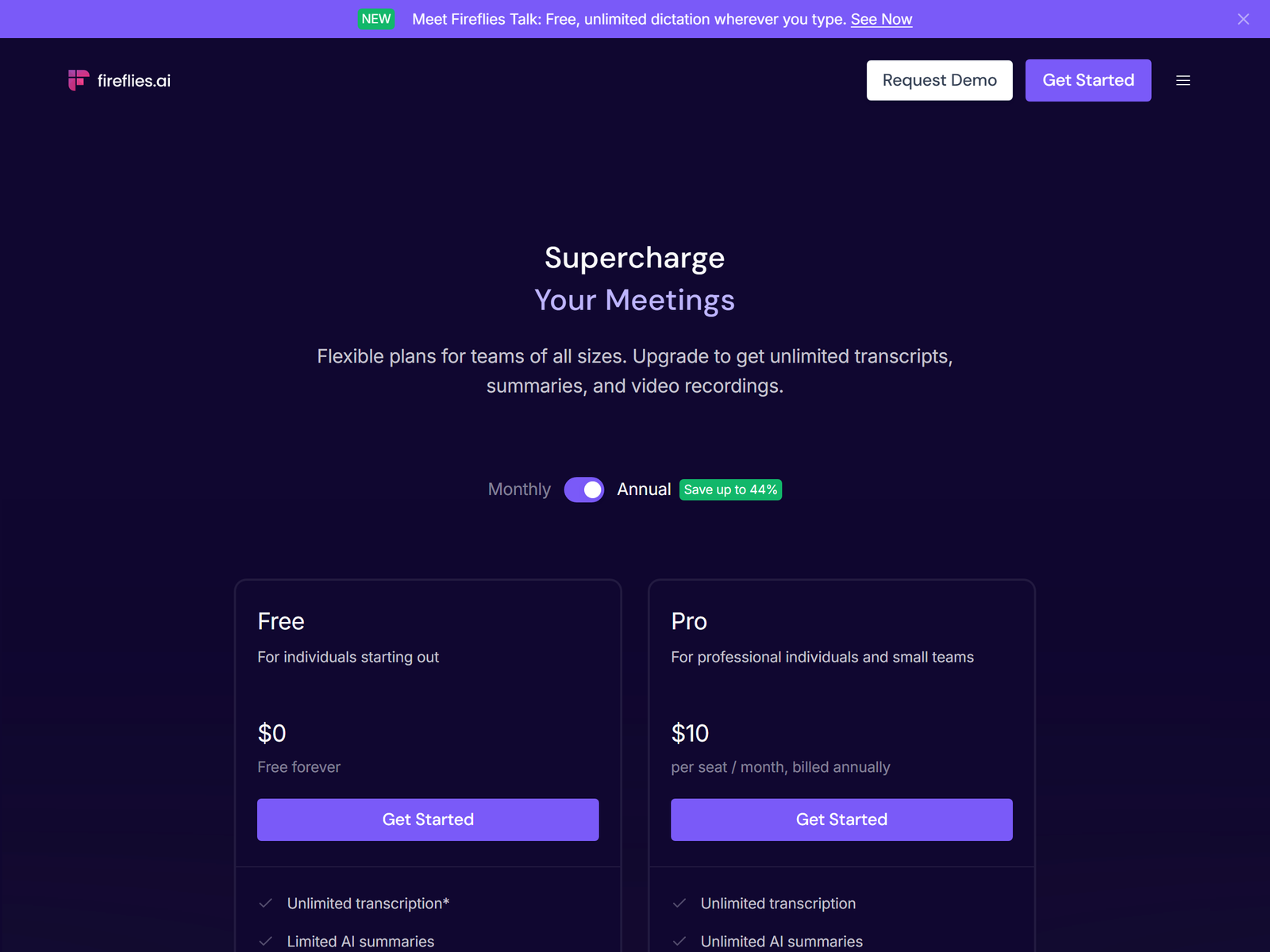
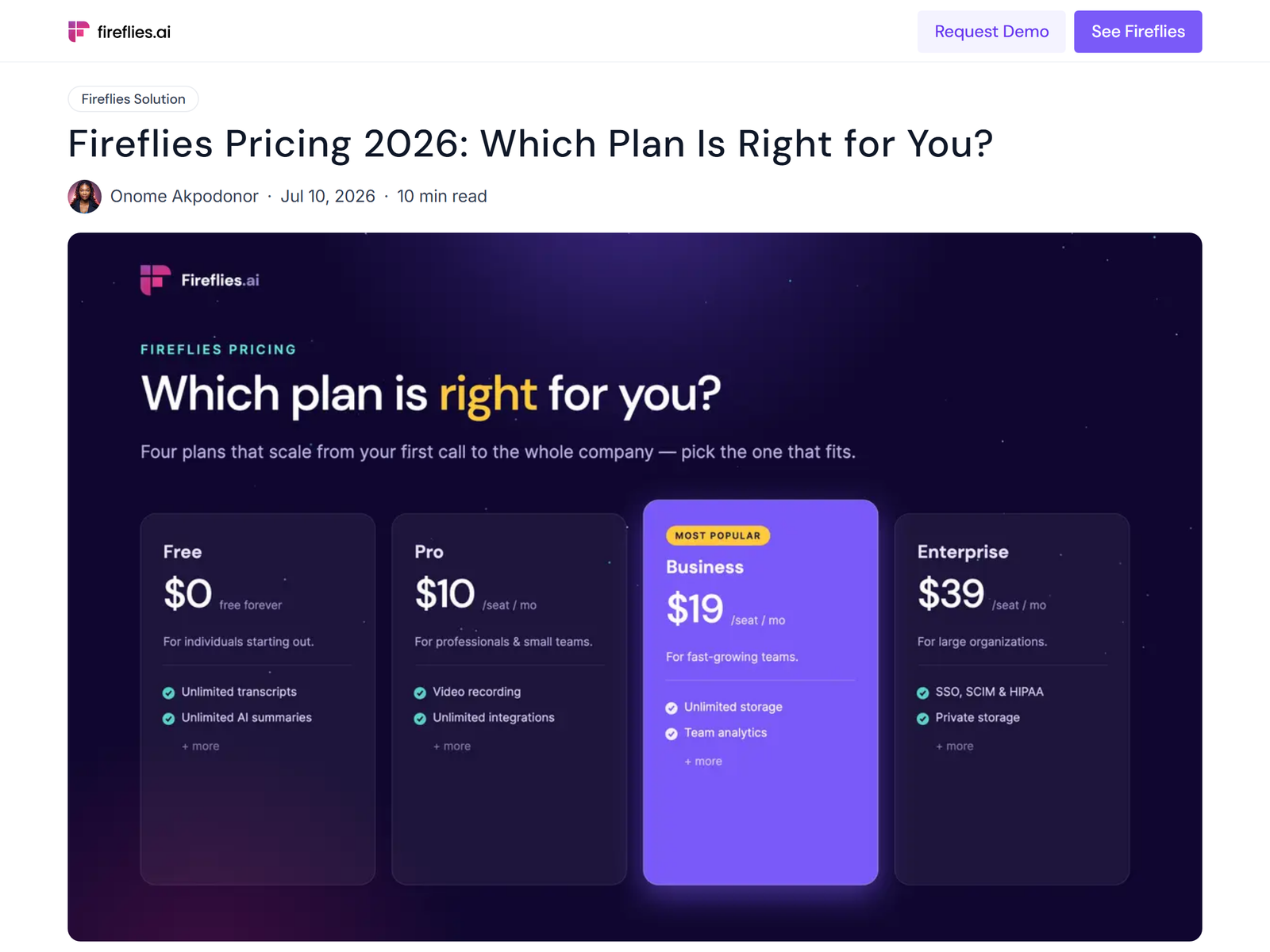
Pricing is per seat. The Free plan gives unlimited transcription with 400 minutes of storage per team and limited AI summaries. The Pro plan is $10 per seat a month billed annually ($18 monthly) for unlimited summaries, 8,000 minutes of storage, video recording, downloads, and CRM integrations. The Business plan is $19 per seat a month annually ($29 monthly) for unlimited storage and conversation intelligence. The Enterprise plan is $39 per seat a month, annual only. A service runs on client Pro seats; you manage them. See the official Fireflies pricing page, or read our Fireflies.ai meeting notetaker review for the feature list.
The offer: meeting-note and action-item service
The offer is simple: you make every client call searchable and actionable. Recruiters, coaches, and small agencies sit in calls all day and never revisit them. You connect Fireflies to their calendar, then deliver a weekly digest: transcripts, a one-page summary per meeting, and a tracked action-item list pushed to their task tool. Charge $200 to $400 a month per seat for a solo client, or $500 to $600 for a small team on Business. A second lane is interview scorecards for hiring managers, using Fireflies' AI Skills to grade calls.
Find buyers through Upwork (search "meeting notes" and "admin support") and by cold-emailing agencies that bill by the call. The pitch is time saved, not the software, because the software is already cheap.
| Fireflies plan | Price per seat / mo | Storage | CRM sync |
|---|---|---|---|
| Free | $0 | 400 min / team | No |
| Pro | $10 ($18 monthly) | 8,000 min | Yes |
| Business | $19 ($29 monthly) | Unlimited | Yes + analytics |
| Enterprise | $39 (annual) | Unlimited | SSO, HIPAA |
Step-by-step: from sign-up to first paid client
- Open a Fireflies account and practice on your own meetings until the summaries read cleanly.
- Pick a buyer (recruiters or coaching practices) and write a one-page "your calls, organized" pitch.
- Offer a paid pilot: connect Fireflies to one client seat for two weeks at $99, then convert to a retainer.
- Set the bot to auto-join, then spend 15 minutes a day editing and routing summaries to the client's tools.
- Invoice monthly and add seats as they see the value, since each seat is a small recurring fee for you.
Client management and quality control
Fireflies summaries are strong but not flawless, so you are the quality layer: you fix speaker labels, merge duplicate action items, and confirm decisions before they reach the client's CRM. Be clear about privacy. Fireflies' terms say it does not train on customer content, but you should still get consent before recording anyone, and never share one client's notes with another. Keep a 30-day delete rule for pilots that do not convert.
Pro tips and pitfalls to avoid
- Price per seat, not per meeting. Recurring seat fees compound; per-call billing caps your income.
- Automate the routing. Use Fireflies' integrations so summaries land in the client's Slack or Notion without you copying them.
- Sell time saved, not the bot. The buyer already knows the tool exists; they pay you to operate it well.
- Don't skip consent. Recording calls without permission is a trust and legal risk; get it in writing.
- Watch storage. Free caps at 400 minutes; put paying clients on Pro so old meetings stay searchable.
Who this is for (and who should skip it)
This fits virtual assistants, freelancers who enjoy operations, and agencies that already manage a client's tools and want a small add-on retainer. It is a bad fit if you want creative work, or if your buyers refuse to have calls recorded, which kills the model. For a pure transcription angle without the bot, see our Otter.ai review as a comparison.
My Take / The Bottom Line
Fireflies.ai is a quiet winner because the software is already cheap and trusted, so you are selling a service, not fighting objections about the tool. At $10 a seat, a $300 client gives you a 30x margin, and the work is roughly 15 minutes a day per account once integrations are set. Hold four to six seats and this is a steady $800 to $1,800 a month with almost no tool cost. It will not make you rich overnight, but it is one of the most defensible recurring-income plays in this category.
FAQ
Do clients need their own Fireflies account? Yes, one Pro seat per person whose meetings you capture. You operate it for them as the service.
Can Fireflies record without a bot joining? The Chrome extension can capture browser meetings without the bot; the desktop app captures system audio for in-person calls.
Is the Free plan usable for paying work? Barely. It caps storage at 400 minutes and limits AI summaries, so paid seats are the right call for clients.
How much time per client? About 15 minutes a day for edits and routing once integrations are live; a weekly digest is the main deliverable.
What if a client refuses recording? Then the model does not work for them; pivot to uploading only meetings they approve in writing.
More playbooks live in our Monetization Guide hub, and you can compare tools on aifreetool.site.