How to Make Money Generating Video Clips With Runway in 2026
Category: Monetization Guide
You can make money generating video clips for creators and small brands with Runway, and a part-time operator realistically earns $300 to $1,200 a month after software. The work is producing short, on-brand AI video: product b-roll, UGC-style ad clips, scene mockups, and background replacement, faster than a client could shoot it. Your tool bill lands between $12 and $28 a month, and what you invoice is the margin. Last updated August 16, 2026 by the aifreetool editorial team. We verified every price on the vendor's pricing page in August 2026; this is an editorial guide and carries no affiliate links.
Quick answer: you are selling finished, usable video assets, not access to the software. The buyers who say yes are creators who need weekly clips, agencies with overflow, and small brands running paid social without a video editor.
Runway is covered on the Runway profile on aifreetool.site, and it is the most complete AI video toolkit on the market. The full feature set and live models are on the official Runway site. Here is the plan, the pricing, and the parts that go wrong.
What Runway Does and What It Costs
Runway Gen-4.5 turns text and images into video, extends clips, replaces backgrounds with inpainting, keeps characters consistent across shots, and generates matching audio. Inside the editor you get restyling, motion brush, and upscaling to 4K, plus partner models like Kling and Seedance, so one workspace covers most client requests. Gen-4.5 costs about 12 credits per second of footage, which is the real unit you spend.
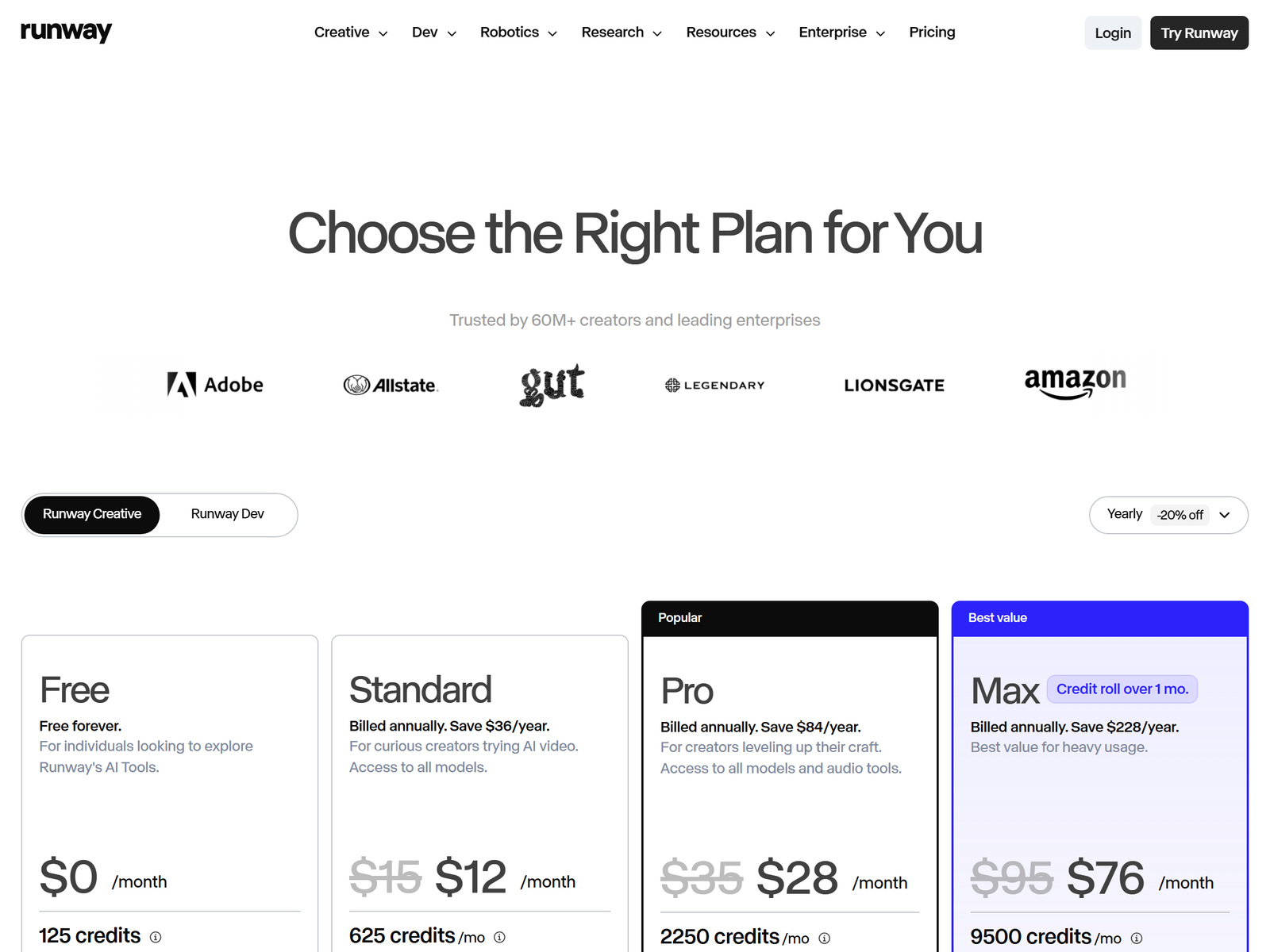
| Plan | Monthly (annual) | Credits | What you get |
|---|---|---|---|
| Free | $0 | 125 one-time credits | Explore the tools, watermarked, limited models |
| Standard | $12 / month | 625 credits / mo (~25s Gen-4.5) | All models, 4K upscale, no watermark |
| Pro | $28 / month | 2,250 credits / mo (~90s Gen-4.5) | Custom voices, 500GB storage, top models |
| Max | $76 / month | 9,500 credits / mo | Credit rollover, first access, highest volume |
The Pro plan at $28 billed annually is the practical floor for paid work; Standard's 625 credits is only about 25 seconds of real footage a month, which runs out after a few client clips. The free tier's 125 credits never expire, which is enough to build a sample reel before you charge.
The Service You Sell and What It Pays
Sell a per-clip or per-package video asset service, not "AI videos". Price by the deliverable.
- Single UGC ad clip: $40 to $90. One 5 to 10 second hero clip with the product and caption-ready framing.
- Background replacement pack: $60 to $150. Swap locations for five to ten existing product shots.
- Monthly creator clip pack: $300 to $600. Eight to twelve short clips plus one restyled hero.
- Brand video retainer: $600 to $1,200. Weekly social clips, a longer explainer, and a refresh cycle.
- Scene mockup add-on: $50 to $120. Visualize a set or location before a real shoot.
Two retained creators at $300 to $600 plus one-off packs put you between $700 and $1,800 in revenue against a $28 tool bill. Realistically a part-timer handles three to five active clients, because each clip is minutes of generation plus review, not a day of editing. The buyers who say yes fastest are YouTube and TikTok creators posting weekly, e-commerce brands needing product b-roll, and agencies with client video overflow.
Step-by-Step: From Free Tier to First Paid Client
- Open the free tier and generate five clips from your own prompts to learn how fast credits burn.
- Pick one niche: e-commerce product b-roll, creator intros, or real-estate walkthroughs.
- Build a three-clip sample for one real prospect using their actual product or face.
- Send a Loom plus a one-page price sheet, then ask for a paid $50 clip.
- Generate in Gen-4.5, extend and restyle inside the editor, export at 1080p.
- Deliver a shared folder with vertical and square cuts plus the raw prompt.
- Offer a monthly pack the moment they ask for "more like that".
- Upgrade to Pro at $28 the week you sign a paying client, because Standard's 25 seconds runs out fast.
Quality Control and the Mistakes That Kill This Work
Gen-4.5 looks real but hands and faces still drift on close-up, so always eyeball a clip before delivery and reroll the bad frames. The second failure mode is the "uncanny" tell: too-smooth motion or warping backgrounds read as AI to viewers, which is fine for a stylized ad but poison for a testimonial. Keep a human or the real product in frame so the clip sells rather than shows off the model. Finally, set a revision cap in writing. A "simple 10-second clip" becomes twenty rerolls; quote three generations and bill the rest, because credits are your real cost.
FAQ
Is Runway Pro worth $28 if I already use CapCut?
For one clip, yes-ish; for a client, definitely, because you are generating the footage itself, not trimming it. CapCut edits; Runway creates. If you have a paying client, the $28 is nothing next to the invoice.
Can I use Runway output commercially for client videos?
Yes. You own what you generate on a paid plan. The client still needs rights to any product, face, or brand shown, so only generate with assets they licensed.
How many clients before I need Max?
Three to five on Pro is plenty. Move to Max at $76 only when you are shipping dozens of clips a month or need credit rollover.
Should I shoot the footage for the client?
Only if you price it in. Most clients hand you a product photo or a selfie and you generate the motion; adding a real shoot turns a remote service into a production job.
How long does a 10-second client clip take?
Roughly 20 to 40 minutes including generation, rerolls, restyle, and export, against a day of traditional filming and editing. That compression is the offer.
My Take: The Bottom Line
The software is not the moat. Anyone can pay $28. What clients pay for is a person who reads the brief, asks what the actual product is, and returns a clip that looks intentional on the same day every week. Runway creates the footage; you do the taste, the consistency check, and the deadline.
My honest read: this is the highest-ceiling video service in this category because Gen-4.5 output is genuinely usable for ads and social, but it is also the most credit-sensitive, so price by the clip, not by the hour. It is a poor fit for anyone who dislikes reviewing frame-by-frame, and it is not passive income. The tool profile is at the Runway page on aifreetool.site, current plans are on runwayml.com/pricing, and more playbooks sit in our Monetization Guides. Start on the free tier tonight, generate five clips, and charge for the sixth.