How to Make Money With Krea AI Design in 2026
Category: Monetization Guide
Reviewed by the aifreetool.site editorial team. This guide is independently written and contains no affiliate links -- we never earn a commission if you sign up for any paid plan. In 2026, you can make money with Krea AI by offering an image-enhancement and design service: clean product photos, remove backgrounds, upscale to print resolution, and generate mockups for online sellers, realtors, and authors.
Quick answer: the business in one paragraph
Krea AI turns a $9-$35 per month subscription into a visual-service shop you resell for $15-$60 per product photo set or $300-$1,500 per client each month. Its real-time canvas, Background Remover, and upscaler to 22K make tedious Photoshop jobs fast. A part-time operator serving Shopify, Etsy, and real-estate clients can earn $600-$2,500 a month.
What Krea AI is (and the plan you would actually use)
Krea AI is a real-time creative canvas that gathers image, video, and 3D models in one workspace. For a reseller the useful tools are Background Remover, the AI Upscaler and Enhancer, real-time image generation with the Krea 2 model, and LoRA training so you can lock a client's style or product look. The platform reports 30,000,000-plus users, which signals stable demand.
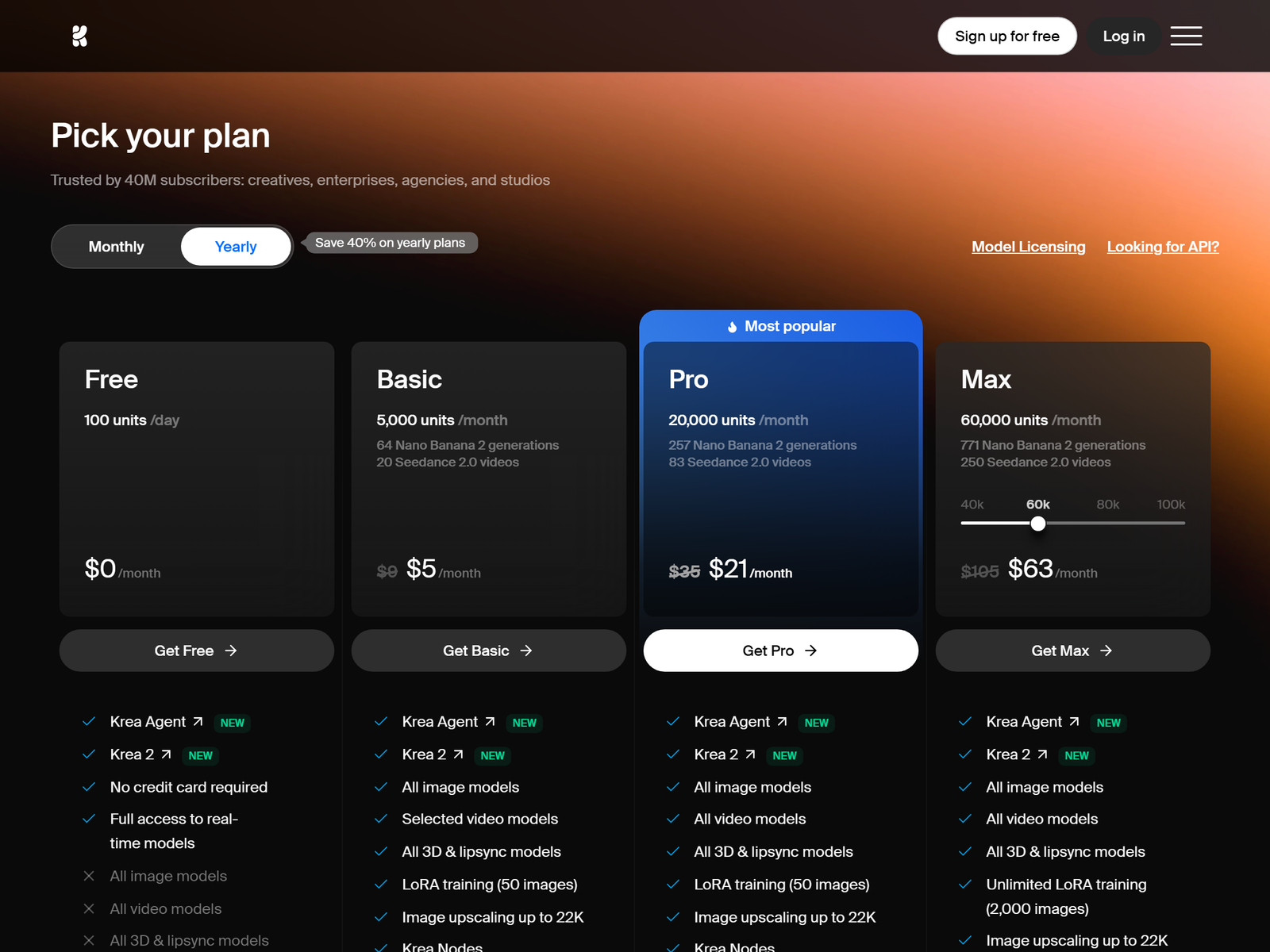
| Plan | Price/mo | Compute units | Best for |
|---|---|---|---|
| Free | $0 | 100/day | Testing only |
| Basic | $9 | 5,000 | Solo freelancer |
| Pro | $35 | 20,000 | Busy studio |
| Max | $105 | 60,000 | High volume |
Start on Basic at $9 -- it includes a commercial licence and upscaling to 22K, which is the core of the service. Move to Pro at $35 once you process dozens of images a week and need all video models for short promo clips.
The monetization idea: a done-for-you photo and mockup shop
The simplest offer is "send me your raw photo, get a clean, on-white, high-res version back." Online sellers need this for every listing; realtors need brightened, upscaled interiors; authors need a cover mockup. Charge $5-$15 per edited image or $15-$60 per product set, and $200-$600 per month for a seller who ships batches weekly. Add print-on-demand art packs at $10-$40 each as a passive upsell. For instance, a jewellery seller with 40 listings paying $45 per set is $1,800 of monthly editing from one clone-free workflow, while your plan cost stays at $9. A realtor who uploads ten interior shots weekly is a natural $250 retainer: brighten, upscale, and deliver same-day so the listing goes live sharp.
Step-by-step: from sign-up to first paid client
- Practice a repeatable workflow: remove background, upscale, then light color fix in one pass.
- Build three fixed-price packages (Single $8, Set of 10 $45, Monthly $250).
- Find sellers on Etsy forums and Shopify groups who complain about bad listing photos.
- Deliver a free before/after sample to the first three prospects to prove speed.
- Process the batch, export at 2000px-plus, and return a tidy zip with named files.
- Ask happy sellers for a public review and raise prices for new clients only.
Client and quality management
Set the expectation that AI upscaling improves sharpness but cannot invent missing detail -- a blurry phone photo becomes a cleaner blurry photo. For on-white product shots, confirm the source has a clean edge so the remover does not clip the item. Cap revisions at two rounds and turn around batches within 48 hours so sellers can keep their listings live. Keep one folder per client to track their style LoRA if you train one.
Pro tips and pitfalls to avoid
- Use the commercial licence on a paid plan; free-tier images cannot be sold.
- Train a LoRA on a client's product line so every new shot matches their catalogue.
- Offer a "listing refresh" pack: old photos re-upscaled and re-backgrounded in one go.
- Bundle a quarterly "catalog refresh" where you reprocess a seller's entire back catalogue after a model update, since upscalers improve over time and old listings look dated fast.
- Do not over-promise "studio quality" from a phone snapshot; manage scope honestly.
Who this is for (and who should skip it)
This fits anyone with an eye for clean visuals who wants a low-talk, high-volume service. It is a poor fit if you dislike repetitive batch work or cannot keep a 48-hour turnaround, because sellers live and die by listing speed. If you prefer writing, a text tool is the better first offer.
My Take / The Bottom Line
Krea AI is the rare image tool where the resale is boring in the best way: background removal and upscaling are chores sellers will always pay to skip. The margin is high because the $9 plan covers a lot of edits, and a style LoRA locks the client to you. Edit honestly about limits, and this is a steady 2026 side business. See the full profile at our Krea AI review, and browse more monetization guides or the aifreetool.site home. Nearby tools to compare: LogoAI and Lovable.
FAQ
Can I sell images made on the free plan? No. The free tier has no commercial licence. Start on Basic at $9 so every delivered file is licensed for client work.
How many photos can Basic handle? About 5,000 compute units a month covers a healthy batch of removes and upscales for several small clients. Upgrade to Pro only when you process daily.
What should I charge per product photo? $5-$15 for a single clean edit and $15-$60 for a 10-image set. Monthly retainers of $200-$600 suit sellers with weekly uploads.
Does upscaling fix a bad photo? It sharpens and enlarges, but cannot recreate detail that was never captured. Be honest with clients so revisions stay minimal.
Is LoRA training worth it? Yes for repeat clients. A product-line LoRA keeps every new shot on-brand, which makes reordering automatic and locks the account to you.
Open the Krea AI pricing page and start a Basic trial, then edit your first sample set. Internal reference: Krea AI on aifreetool.site.