

Last Updated: January 21, 2026 | Review Stance: Independent testing, includes affiliate links
Jump to Section
Quick Take - RemakeFace.ai in 2026
Super easy AI face swap for photos and short videos—realistic results, no watermark, free credits when you sign up. Great for funny memes, fixing bad group pics, gender swaps, celeb makeovers, or turning yourself into anime/cartoon. Privacy is solid, and it's quick. Perfect casual fun tool.
What RemakeFace.ai Is All About (My Hands-On Take)
RemakeFace.ai is this cool online tool that lets you swap faces in pics and short clips using AI. You just upload your photo (or video), pick the face to swap in, and boom—done in seconds with pretty natural-looking results. No annoying watermarks, and they don't keep your images unless you say so.
I tested it by trying swaps with friends, celebs, movie characters, gender flips, and even artistic styles. Also played with the beautify button and text prompts for edits. This review comes straight from real use in 2026—fun stuff for social media, pranks, or just messing around.

Classic before/after swap—looks pretty seamless (from official demos)
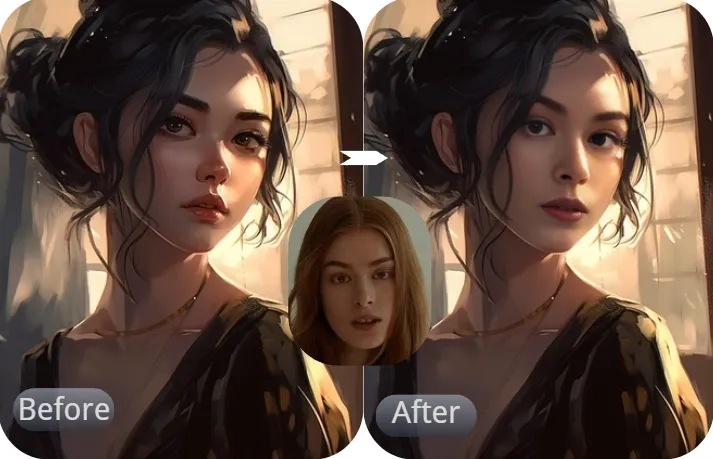
Swapping into famous painting—fun artistic twist (official showcase)
Social Media Fun
Memes, pranks, celeb selfies for TikTok/Instagram.
Fix Group Photos
Swap heads to fix blinks or weird faces.
Creative Edits
Gender swap, anime/cartoon styles, makeup/hairstyle try-ons.
Holiday & Costume
Santa, Halloween, virtual try-on fun.
Cool Stuff It Can Actually Do
Main Things I Liked
- Face Swap Magic: Photos, videos, GIFs—single or multiple faces, super quick.
- Fun Transformations: Celeb, movie/anime characters, gender flip, head swaps for better expressions.
- One-Click Beautify: Smooth skin, remove wrinkles, instant glow-up.
- Artistic Filters: Turn real pics into cartoon, oil painting, anime styles.
- Text-Prompt Edits: Describe changes (e.g. "add sunglasses" or "change background")—AI handles it.
- Privacy First: Doesn't store your stuff unless you want.
How It Performs in Real Life
In my tests, swaps look surprisingly natural most of the time—especially single faces. Multi-person or tricky angles can need a retry, but overall speed is impressive (seconds). HD output is clean, no watermarks even on free tries. Beautify and style filters are addictive for quick enhancements.
What Stands Out
No Watermark
Fun Variety
Privacy Safe
Free Starter
How Much It Costs (Real Talk)
Free Trial
$0
Get Started
- Free credits on signup
- Basic swaps & edits
- No watermark
- Limited daily use
Paid Packages
From ~$5–$20+
More Credits
- One-time credit buys
- Unlimited-ish use
- Faster priority
- Best for heavy users
As of January 2026, new users get free credits right away. Paid is one-time credit packs (no monthly sub). Check the site for exact current offers—prices can shift.
Pros & Cons (Honest List)
What I Love
- Really quick and easy—no skills needed
- No watermark even free
- Tons of fun ideas (celebs, anime, gender flips)
- Good privacy setup
- Free credits to start
- Beautify button is surprisingly useful
What Could Be Better
- Free credits run out fast if you go wild
- Complex swaps sometimes need tweaks
- Video swaps limited to short clips
- No offline app version
My Verdict: 8.7/10
RemakeFace.ai is a blast for quick, watermark-free face fun in 2026. Super easy, creative options galore, and privacy feels trustworthy. Free start is generous—great casual tool, though heavy users will want credits top-up.
Fun Factor: 9.0/10
Quality: 8.5/10
Value: 8.7/10
Ready to Swap Some Faces?
Grab your free credits and start playing—sign up takes seconds, and the results are hilarious.
Free credits on signup as of January 2026.
















