Last Updated: January 15, 2026 | Review Stance: Independent testing, includes affiliate links
Quick Navigation
TL;DR - RecCloud 2026 Review
RecCloud is a versatile AI multimedia platform in 2026, excelling in speech-to-text, subtitles, dubbing, translation, summarization, and text-to-video across 100+ languages. User-friendly with free limited access and credit system, it's great for creators and global teams seeking efficient content processing.
RecCloud Review Overview and Methodology
RecCloud is an AI-powered online platform for audio/video processing, offering transcription, translation, dubbing, summarization, and generation tools. It supports cloud-based workflows with high accuracy and multilingual capabilities (100+ languages).
This 2026 review is based on testing core AI features like transcription accuracy, translation quality, dubbing naturalness, and ease of use across scenarios such as YouTube summarization, meeting notes, and multilingual content creation.

RecCloud intuitive dashboard and tools overview
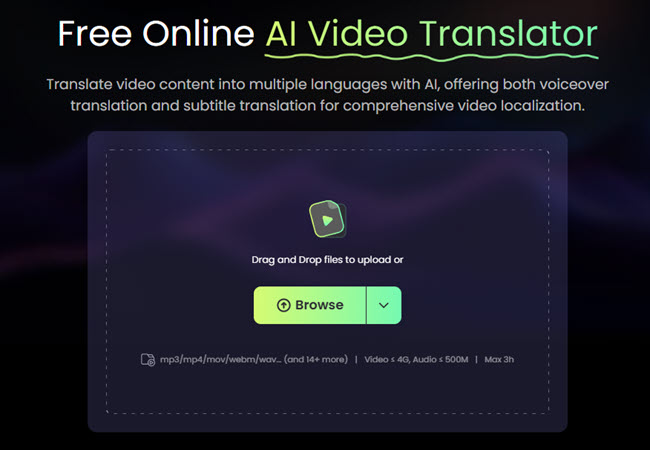
Uploading video for AI translation and processing
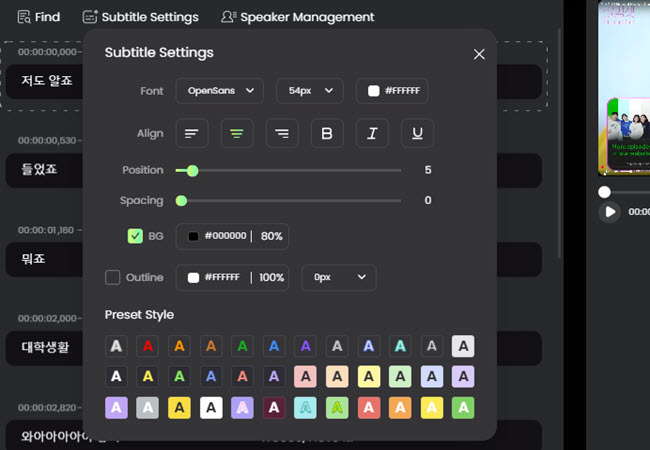
Editing AI-generated translations and subtitles
Content Creation
Subtitles, dubbing, text-to-video for YouTube/social media.
Education & Meetings
Transcription, summarization, note-taking from lectures/Zoom.
Global Marketing
Multilingual video translation & dubbing.
Daily Use
Screen recording, basic editing, vocal removal.
Core Features of RecCloud
Key Tools & Capabilities
- AI Speech to Text: Accurate transcription with auto-polish, summarization for meetings/lectures.
- AI Subtitle Generator: Auto subtitles in original/multiple languages, timed & editable.
- AI Video Translator & Dubbing: Translate/dub videos with natural voices, lip-sync in 100+ languages.
- AI Text to Speech/Voice Generator: Natural voices, multi-language support.
- AI Summarization: Video/audio highlights, YouTube summarizer with AI interaction.
- AI Text to Video: Generate videos from scripts/text.
- Basic Editing: Trim, crop, merge, vocal remover, screen recorder.
User Experience Highlights
- Intuitive online interface, no download needed
- Fast processing with high accuracy
- Editable outputs & real-time previews
- Cloud storage & sharing (QR/links)
- Secure with GDPR/ISO compliance
RecCloud Functionality & Performance
In 2026, RecCloud provides strong AI accuracy (high transcription/dubbing quality), supports 100+ languages, and speeds up workflows significantly (up to 50x faster than manual). Credit system manages usage effectively.
Key Advantages in Performance
High Accuracy
Fast Processing
Integrated Tools
User-Friendly
RecCloud Use Cases
Ideal Scenarios
- Content creators adding multilingual subtitles/dubbing
- Educators transcribing & summarizing lectures
- Marketers creating global video campaigns
- Businesses handling meeting notes & YouTube repurposing
- Students/individuals for quick note-taking & content generation
Integration Options
Online Editor
Cloud Storage
Sharing Tools
Mobile App
RecCloud Pricing & Plans
Free Tier
$0 (Limited)
Basic access
- Limited credits/minutes
- Free for first minute on some tools
- Basic features & storage (2GB)
- No commercial use
Paid Plans
From $4.99-$28+/month (Weekly/Annual)
Flexible credits
- More credits (180-3000+/month)
- Higher storage & commercial use
- Unlimited access to advanced features
- Pay-as-you-go extra credits
As of January 2026, uses credit system (1 credit/min after free trial); annual discounts up to 80%. Check official site for current rates & trials.
Pros & Cons: Balanced Assessment
Strengths
- Comprehensive AI tools in one platform
- Strong multilingual support (100+ languages)
- Fast & accurate processing
- Free trial & easy online access
- Good for global content repurposing
- Secure & compliant
Limitations
- Credit limits on free tier
- Advanced features require subscription
- Credit costs add up for heavy use
- Some tools less advanced than specialized competitors
- No offline mode
Who Should Use RecCloud?
Best For
- Content creators & YouTubers
- Educators & online teachers
- Marketers needing multilingual videos
- Businesses for meetings/transcriptions
- Global audience targeting
Consider Alternatives If
- You need unlimited free pro features
- Prefer desktop/offline software
- Require ultra-advanced editing (e.g., Premiere-level)
- Want no credit system
Final Verdict: 8.9/10
RecCloud is a strong, integrated AI platform in 2026 for audio/video tasks, with excellent multilingual tools and workflow efficiency. Its free entry and broad features make it highly accessible—credit limits are the main drawback for heavy users.
Accuracy: 9.0/10
Value for Money: 8.7/10
Feature Set: 9.1/10
Try the All-in-One AI Video Platform in 2026
Start free with AI transcription, translation, dubbing, and more—unlock powerful multimedia tools today.
Free trial & limited credits available as of January 2026.