Last Updated: January 06, 2026 | Review Stance: Independent testing, includes affiliate links
Quick Navigation
TL;DR - Descript 2026 Review
Descript excels as an AI-driven audio/video editor in 2026, with groundbreaking text-based editing, powerful Underlord AI for automation, voice cloning, and enhancements like eye contact and green screen. It's a time-saver for podcasters and creators, with a solid free plan and flexible paid options—though heavy AI use incurs credits.
Descript Review Overview and Methodology
Descript is an innovative AI-powered platform for editing audio and video like a document—transcribing content and allowing edits via text. Evolving rapidly through 2026 with Underlord AI and generative tools, it's ideal for simplifying professional-grade production.
This review evaluates the web/desktop app based on real-world testing for transcription accuracy, editing efficiency, AI feature performance, and usability in podcasting, video creation, and team workflows.
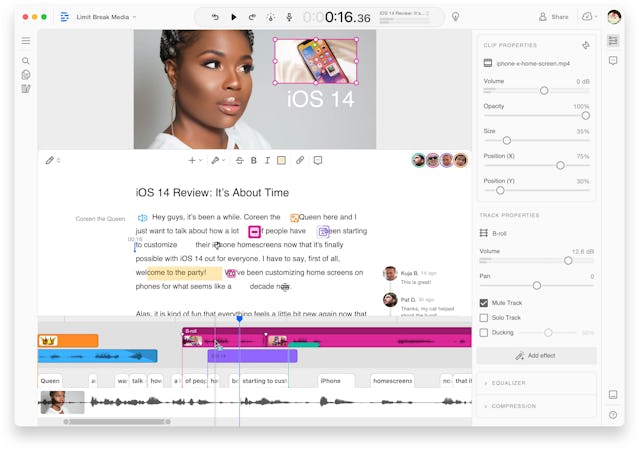
Descript's intuitive text-based editing interface (2026)

Underlord AI assisting with video editing

Regenerate AI voice cloning tutorial example
Podcasting
Transcription, filler removal, multi-track editing.
Video Creation
Tutorials, demos, social clips with AI design.
Marketing & Teams
Internal videos, sales enablement, training.
Content Repurposing
Clips for social media, translations.
Core Features of Descript
Key Tools & Capabilities
- Text-Based Editing: Edit audio/video by modifying the transcript—cuts, rearrangements sync automatically.
- Underlord AI: AI co-editor for scripting, designing layouts, adding B-roll, transitions, and generating content.
- Regenerate (Voice Cloning): Type corrections or new lines in your cloned voice.
- AI Enhancements: Studio Sound, filler removal, eye contact, green screen, captions, translation.
- Generative Tools: AI avatars, custom B-roll, animated images.
- Collaboration: Remote recording rooms, screen recording, publishing.
- Clips & Export: Auto-generate short-form content.
User Experience Highlights
- Intuitive like editing a doc—no pro skills needed
- Fast transcription and real-time previews
- One-click AI fixes save hours
- Web/desktop app with cloud sync
- Stock media and templates
Descript Functionality & Performance
In 2026, Descript's AI delivers high-accuracy transcription, natural voice cloning, and effective enhancements, with Underlord automating complex designs reliably for most tasks.
Key Advantages in Performance
AI Accuracy
Voice Naturalness
Automation
Ease for Beginners
Descript Use Cases
Ideal Scenarios
- Podcasters editing episodes quickly
- YouTubers/TikTok creators making polished videos
- Marketing teams producing demos/training
- Educators and businesses for internal comms
- Solo creators repurposing long-form content
Integration Options
Web App
Desktop
Stock Library
Publishing
Descript Pricing & Plans
Free Plan
$0/month
Basic testing
- Limited transcription/export
- Basic editing
- Watermarked exports
- Limited AI features
Hobbyist/Creator Plan
$12-24/month
For individuals
- More hours/credits
- Full AI tools access
- HD exports
- Advanced features
Business Plan
$55+/month
For teams
- Higher limits
- Collaboration tools
- Priority support
- Custom options
As of January 2026, plans use credits for AI features; annual billing saves ~20%. Enterprise custom pricing available. Check official for latest.
Pros & Cons: Balanced Assessment
Strengths
- Revolutionary text-based editing
- Powerful AI automations save time
- Excellent transcription & enhancements
- Intuitive for non-experts
- Strong for podcast/video workflows
- Free tier to start
Limitations
- Occasional bugs in AI features
- Credit limits on heavy AI use
- Learning curve for advanced tools
- No unlimited free AI
- Some features less reliable
Who Should Use Descript?
Best For
- Podcasters & YouTubers
- Content creators
- Marketing/education teams
- Beginners in video editing
- Solo professionals
Consider Alternatives If
- You need fully free unlimited AI
- Require advanced manual controls
- Prefer traditional timeline editors
- Frequent bugs frustrate you
Final Verdict: 9.0/10
Descript is a game-changer in 2026 for audio/video editing, making professional results accessible via AI and text-based workflows. Its innovations like Underlord and Regenerate outperform competitors for efficiency—minor bugs aside, it's highly recommended for creators.
AI Features: 9.2/10
Value for Money: 8.7/10
Overall Innovation: 9.3/10
Try the Leading AI Audio & Video Editor in 2026
Edit like a doc with powerful AI—start free with transcription, basic editing, and limited AI features today.
Free plan available as of January 2026.